Subnet Calculator
Type an IPv4 address with a prefix or mask to get the network, broadcast, usable host range, mask and host count.
Recent
Your last 10 settings, saved only in this browser. Nothing is uploaded.
Popular tools
- Well Known PortsLook up a TCP or UDP port number, a range or a service name and see what the IANA registry assigns to it.
- Well Known PortsLook up a TCP or UDP port number, a range or a service name and see what the IANA registry assigns to it.
- Subnetting Practice QuestionsChoose a difficulty and question type to get a subnetting worksheet; tick Show answers for the key.
How to use the subnet calculator
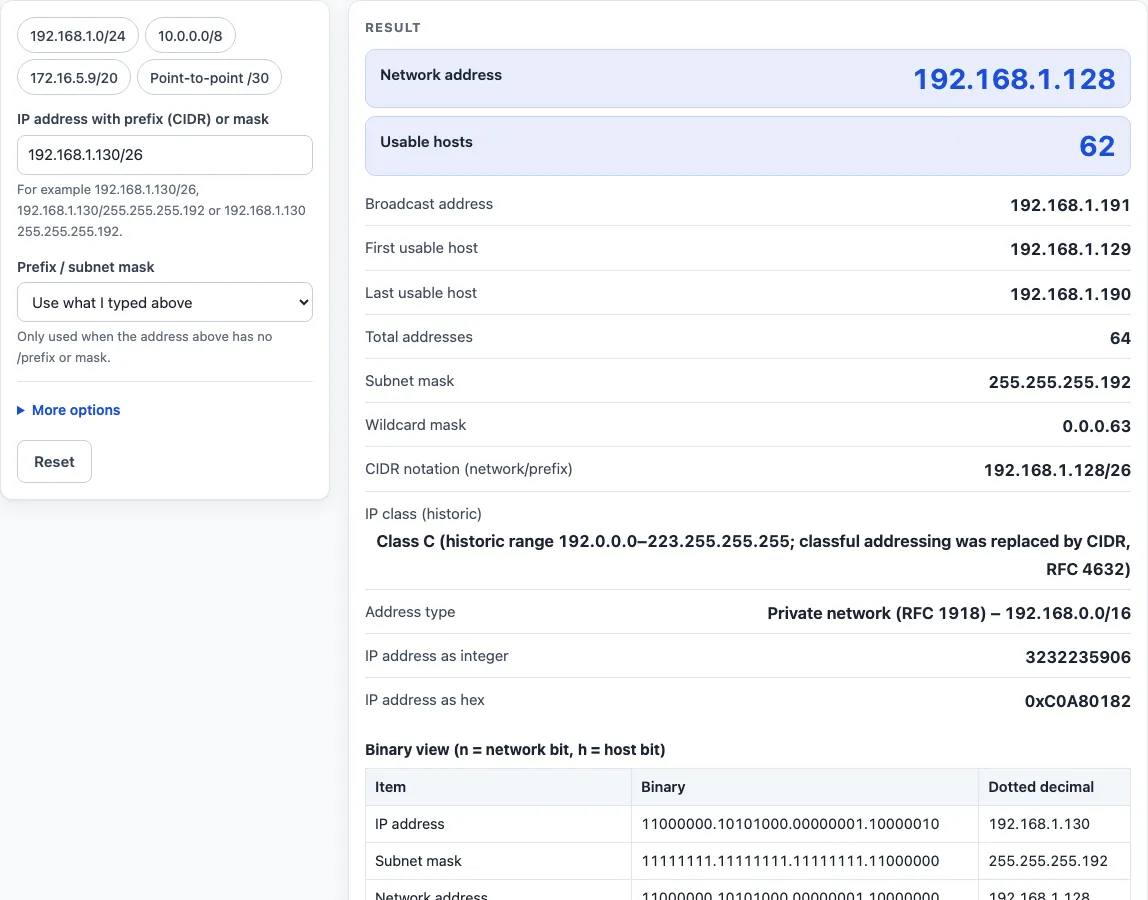
- Type an IPv4 address into the address field with its prefix or mask. Examples that work are 192.168.1.130/26, 192.168.1.130/255.255.255.192 and 192.168.1.130 255.255.255.192.
- If you type no prefix, open the drop-down list and choose a value from /0 to /32. Each entry shows its dotted mask, for example /26 – 255.255.255.192. A prefix typed in the address field always wins, and a warning tells you the list value was ignored.
- Read the result. The network address and usable hosts appear first. Below them are the broadcast address, first and last usable host, total addresses, subnet mask, wildcard mask, CIDR notation, historic IP class, address type, and the address as an integer and in hex.
- Open “How it was calculated” under the result to see the formula, the values put into it, and the answer.
- To list smaller networks, open More options and enter a prefix in the “Split into subnets of /n” field. Each row shows a subnet’s network address, usable range, broadcast address and usable hosts.
The four preset buttons above the form load typical cases. Reset restores the starting example. “Copy result” copies the result lines with a link. “Copy link” copies the page address, which stores your inputs in the ?s= part of the URL, so the same calculation reopens later or can be sent to a colleague. “Print / save as PDF” produces a one-page record with the inputs, results, calculation steps and the date.
How to find an IP subnet mask
The subnet mask is set by the prefix length, the number after the slash. A prefix of /26 means the first 26 bits of the address identify the network, and the remaining 6 bits identify hosts. Written in binary, the mask is 26 ones followed by 6 zeros: 11111111.11111111.11111111.11000000. In dotted decimal that is 255.255.255.192.
The wildcard mask is the reverse of the subnet mask. Each 0 becomes 255 and each 255 becomes 0, so 255.255.255.192 gives 0.0.0.63. Wildcard masks are often used in router access lists.
If you only have an address and no prefix, the prefix must come from your network design or device documentation. The calculator can then take a value from its drop-down list of /0 to /32.
How to calculate an IP subnet mask
Two formulas do most of the work. The network address is the IP address AND the subnet mask, applied bit by bit. The broadcast address is the network address OR the wildcard mask. Using 192.168.1.130/26, the last octet 130 is 10000010 in binary. Combined with the mask’s last octet 11000000 using AND, the result is 10000000, which is 128. The network address is therefore 192.168.1.128.
The wildcard mask 0.0.0.63 has 63 in its last octet, so the broadcast address is 128 OR 63, which is 191. The network runs from 192.168.1.128 to 192.168.1.191.
How many usable hosts does a subnet have?
The number of addresses in a subnet is 2 raised to the number of host bits, which is 2^(32 − prefix). A /26 has 6 host bits, so it contains 2^6 = 64 addresses. Two of these are reserved: the network address, which identifies the subnet, and the broadcast address, which reaches all hosts. That leaves 64 − 2 = 62 usable hosts. The steps list in the calculator writes out these numbers with your values.
What does a shorter prefix such as /20 give?
A shorter prefix means a bigger network, and a longer prefix a smaller one. A /20 has 12 host bits, which gives 4,096 total addresses and 4,094 usable hosts. For 172.16.5.9/20, the network is 172.16.0.0 and the broadcast is 172.16.15.255. The calculator also reports the subnet mask 255.255.240.0 for this case.
Worked examples
| Input | Result |
|---|---|
| 192.168.1.130/26 | network 192.168.1.128, broadcast 192.168.1.191, 62 usable hosts |
| 10.20.30.40/8 | network 10.0.0.0, broadcast 10.255.255.255, 16,777,214 usable hosts |
| 172.16.5.9/20 | network 172.16.0.0, broadcast 172.16.15.255, 4,094 usable hosts |
| 192.168.0.0/24 | network 192.168.0.0, broadcast 192.168.0.255, 254 usable hosts |
| 203.0.113.9/30 | network 203.0.113.8, broadcast 203.0.113.11, 2 usable hosts |
| 198.51.100.4/31 | network 198.51.100.4, broadcast 198.51.100.5, 2 usable hosts |
Calculated by the tool above with these values.
Frequently asked questions
Is the calculator free, and is anything I type uploaded?
Yes, the calculator is free and needs no account or sign-up. Everything is calculated in your browser, and nothing you type is sent anywhere. Results may be used in any work, including commercial reports, theses and client projects, without attribution.
Can I print or share a calculation?
Yes. “Print / save as PDF” creates a one-page record with the inputs, results, calculation steps and date. “Copy link” stores your inputs in the page address, so the same calculation can be reopened or sent to someone else.
Why does a /26 show 62 usable hosts instead of 64?
The network address and the broadcast address cannot be assigned to devices. Subtracting those two from the total gives the usable count, which is 2^(32 − prefix) − 2.
What happens if I enter a /31 or /32?
A /31 follows RFC 3021 for point-to-point links. It has two usable addresses, with no network or broadcast address, and a warning explains its purpose. A /32 is a single host address with 1 usable host, and the calculator shows a warning.
Can I enter a subnet mask instead of a prefix?
Yes. You can type 192.168.1.130/255.255.255.192 or 192.168.1.130 255.255.255.192. A non-contiguous mask such as 255.0.255.0 is rejected with a plain message. If you enter a wildcard mask such as 0.0.0.255, the calculator recognises it and suggests the matching subnet mask.
Why does the calculator warn that my IP address cannot be assigned?
For /30 and shorter prefixes, a warning appears if the address you typed is the subnet’s network address or its broadcast address. Neither can be given to a host.
Related tools
- Subnet mask calculator: use it when you know a prefix and need its dotted mask, or the reverse.
- CIDR calculator: use it to work with CIDR notation and prefix lengths.
- IP range to CIDR converter: use it when you start with a first and last address and need matching CIDR blocks.
- Subnet cheat sheet: use it for a quick reference of prefixes, masks and host counts.
- Wildcard mask calculator: use it when you need the wildcard mask for access lists.
- IP to binary converter: use it to see an address and mask in binary.
- VLSM calculator: use it when one address block must be split into subnets of different sizes.
- Visual subnet calculator: use it to see how a block is divided on a diagram.
- Subnetting practice: use it to test your subnetting skills with practice questions.