/16 Subnet Calculator
Find which /16 network an IP address is in and list every /16 block of a bigger network, with host ranges and broadcasts.
Recent
Your last 10 settings, saved only in this browser. Nothing is uploaded.
This free /16 subnet calculator takes an IPv4 address and shows the /16 block it belongs to, with the block’s network address, broadcast address and usable host range. A /16 subnet uses the mask 255.255.0.0 and holds 65,536 addresses. The calculation runs in your browser, so there is no sign-up and nothing you type is uploaded. The prefix is fixed at /16, so every result on this page is about /16 blocks. You can also enter a larger parent network, such as 10.0.0.0/8, and see all of its /16 subnets in a table.
Use it to plan the second octet of a 10.0.0.0/8 network or to check which /16 an address belongs to.
How to use the /16 subnet calculator
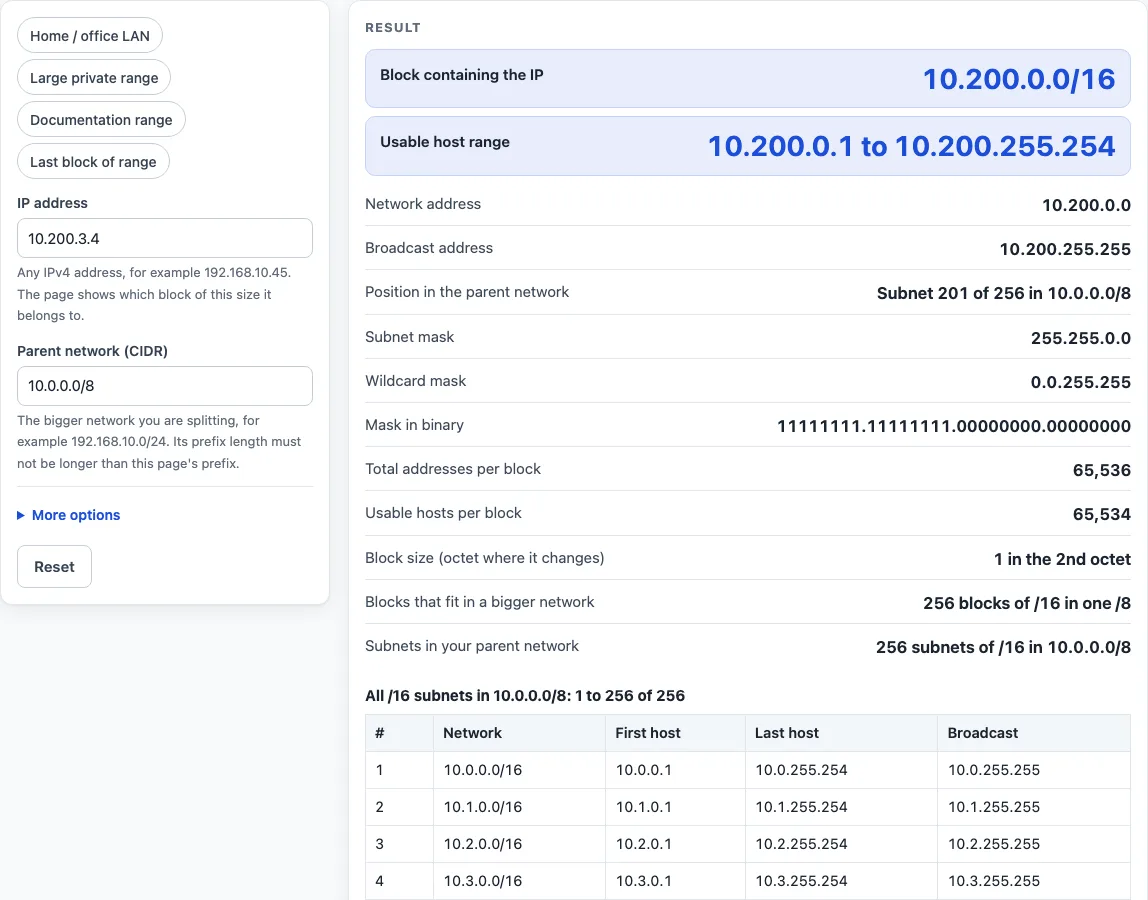
- Type an IPv4 address into the IP address field, for example 10.200.3.4. Leading zeros (such as 010) and values above 255 are rejected.
- Check the Parent network (CIDR) field. The default is 10.0.0.0/8. Its prefix must be /16 or shorter, or the tool shows an error. If host bits are set, the parent is rounded down to its network address and a warning appears.
- Read the primary results. For the default example, the /16 block is 10.200.0.0/16, with usable hosts 10.200.0.1 to 10.200.255.254.
- Scroll through the other result rows: broadcast address, position in the parent (“Subnet 201 of 256”), mask, wildcard, binary mask, total addresses, usable hosts, block size and blocks per bigger network.
- Look at the subnet table. It lists the /16 subnets of the parent, 256 rows at a time. To move to another page, open More options and enter a start number. Typing 257 shows subnets 257 to 512.
- Open How it was calculated under the result to see the formula, the values used and the answer.
The preset chips (“Home / office LAN”, “Large private range”, “Documentation range”, “Last block of range”) fill in typical cases. Reset restores the starting example. Copy result copies the result lines with a link, and Copy link copies a page address that keeps your inputs. Print / save as PDF creates a one-page record of the inputs, results, steps and date.
What is the /16 subnet mask?
A /16 prefix keeps the first 16 bits of the address for the network and leaves 16 bits for hosts. Written out, the mask is 11111111.11111111.00000000.00000000, which is 255.255.0.0 in dotted decimal; the wildcard (inverse) mask used in router access lists is 0.0.255.255. Each /16 block holds 2^16 = 65,536 addresses. The first is the network address and the last is the broadcast address (RFC 950), so 65,534 are usable hosts.
How do you find the /16 subnet of an IP address?
A /16 ends exactly on an octet boundary, so no arithmetic is needed: keep the first 2 octets of the address and set the rest to 0. For 10.200.3.4 that gives 10.200.0.0. The network is therefore 10.200.0.0/16, the usable hosts run from 10.200.0.1 to 10.200.255.254, and the broadcast address is 10.200.255.255.
How many /16 subnets fit in a larger network?
Each step of one bit doubles the count, so a /8 holds 2^(16 − 8) = 256 subnets of size /16. In 10.0.0.0/8 they start at 10.0.0.0 and go up in steps of 1 in the second octet, to 10.255.0.0/16; 10.200.0.0/16 is number 201. The table on this page lists them with their first host, last host and broadcast address, 256 rows at a time.
How does a /16 compare with the sizes next to it?
One bit shorter, a /15 doubles the block to 131,072 addresses (131,070 usable hosts); one bit longer, a /17 halves it to 32,768 addresses (32,766 usable hosts). Two neighbouring /16 blocks can be joined into one /15 only when the first of them starts on a multiple of 2 in the second octet — 10.200.0.0/15 contains 10.200.0.0/16, 10.201.0.0/16.
How is a /16 written in different configurations?
The same mask appears in several forms depending on the device or file: CIDR notation /16 (most routers, cloud consoles and firewalls), dotted decimal 255.255.0.0 (older interface settings, DHCP), hexadecimal 0xFFFF0000 (some Unix tools such as ifconfig on BSD), and the wildcard 0.0.255.255 in router access lists and OSPF network statements. They all describe the same 65,536-address block.
Where is a /16 used?
A /16 (the size of an old class B network) holds 65,536 addresses; it is usually split further, for example into 256 /24s, rather than used as one flat network.
Worked examples
| Input | Result |
|---|---|
| IP 10.200.3.4, parent 10.0.0.0/8 | 10.200.0.0/16, hosts 10.200.0.1 to 10.200.255.254 |
| IP 10.0.0.1, parent 10.0.0.0/8 | 10.0.0.0/16, hosts 10.0.0.1 to 10.0.255.254 |
| IP 172.16.50.9, parent 172.16.0.0/12 | 172.16.0.0/16, hosts 172.16.0.1 to 172.16.255.254 |
| IP 192.168.1.1, parent 192.168.0.0/16 | 192.168.0.0/16, hosts 192.168.0.1 to 192.168.255.254 |
Calculated by the tool above with these values.
Frequently asked questions
What is the subnet mask for a /16?
255.255.0.0, with wildcard mask 0.0.255.255. In binary the mask is 11111111.11111111.00000000.00000000.
How many usable hosts does a /16 have?
65,534. A /16 has 65,536 addresses in total, and the network and broadcast addresses are not assigned to hosts.
How many /24 subnets are in a /16?
- Each /24 takes one value of the third octet, from x.y.0.0/24 to x.y.255.0/24.
What is the first and last usable IP address in a /16?
The first usable address is the network address + 1 and the last is the broadcast address − 1. For 10.200.0.0/16 that is 10.200.0.1 to 10.200.255.254.
What does the warning about host bits mean?
The parent network you typed is not a network address (it has host bits set), so the calculator rounds it down to its network address and says so.
Is the calculator free, and is anything I type uploaded?
Yes, it is free, needs no sign-up, and every calculation runs in your browser; nothing you type is uploaded. Results may be used in any work, including commercial projects, without attribution.
Can I print or share a calculation?
Yes. Print / save as PDF gives a one-page record with the inputs, results, steps and date, and Copy link stores your inputs in the page address so the same calculation reopens later.
Related tools
- /29 subnet mask: Use this when you need to work out a very small block of addresses.
- /27 subnet: Use this for a medium-sized block with 30 usable hosts.
- /23 subnet mask: Use this when you need a block that is smaller than a /16 but larger than a /24.
- /22 subnet: Use this for a block of four /24 networks.
- Subnet cheat sheet: Use this for a quick reference of masks, block sizes and host counts.
- Subnet calculator: Use this to work with any IPv4 address and prefix length.