CIDR Calculator
Type a CIDR block such as 192.168.8.0/22 to get its IP range, size, masks and the blocks next to it.
Recent
Your last 10 settings, saved only in this browser. Nothing is uploaded.
How to use the CIDR calculator
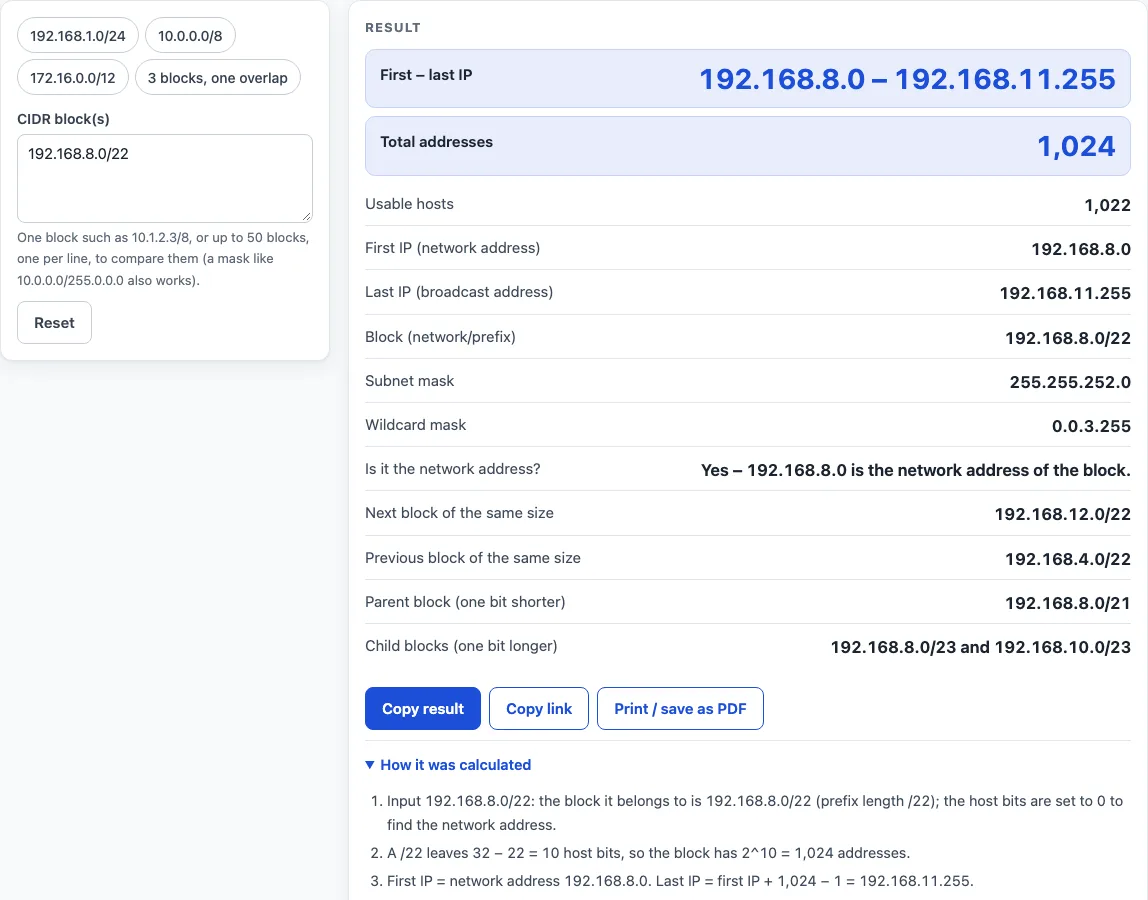
- Click the input box and type a block in CIDR form, for example 192.168.8.0/22. A mask such as 10.0.0.0/255.0.0.0 also works.
- To check several blocks, put one on each line. Commas and semicolons also separate entries. Up to 50 blocks are accepted.
- Read the result as you type. The range appears as “first – last IP”, with the total number of addresses beside it.
- Read any warning under the result. If you typed a host address, such as 10.1.2.3/8, the tool says it is a host inside 10.0.0.0/8 and uses that block.
- Scroll to the neighbouring blocks: the next and previous block of the same size, the parent block and the two child blocks. “none” appears where there is no neighbour, such as no parent for /0.
- For a list, check the overlap line and the table, which shows block, first IP, last IP, addresses and usable hosts for each entry.
- Open “How it was calculated” to see the formula, the values substituted and the answer.
Use the preset buttons above the form to load typical cases, and press Reset to return to the starting example. “Copy result” copies the result lines with a link. “Copy link” copies a page address that stores your inputs, so the same calculation reopens later or can be sent to a colleague. “Print / save as PDF” prints a one-page record of the inputs, results, steps and date.
What is CIDR?
CIDR, or Classless Inter-Domain Routing, is a way of writing IP addresses as a network address plus a prefix length. It replaced the older fixed classes A, B and C, so a network can be any size that is a power of two. RFC 4632 defines the notation and the alignment rules.
What does CIDR stand for, and what does it mean?
CIDR stands for Classless Inter-Domain Routing. “Classless” means the old fixed class sizes are not used. “Inter-domain routing” refers to how routers use these blocks to pass traffic between networks.
What is CIDR notation?
CIDR notation writes an address, then a slash, then a prefix length, such as 192.168.8.0/22. The prefix is the number of leading bits that stay the same across the whole block. The remaining 32 minus the prefix are host bits, and they vary from address to address.
CIDR notation explained
The size of a block is 2 to the power of (32 minus the prefix). For /22, that is 2^10, or 1,024 addresses. The first IP is the network address, with all host bits set to zero. The last IP is the first IP plus the size minus 1. For 192.168.8.0/22, that is 192.168.8.0 + 1,023 = 192.168.11.255.
Usable hosts are the size minus 2, because the network and broadcast addresses cannot be assigned to devices. So a /22 has 1,022 usable hosts. The exceptions are /31, which has 2 usable hosts under RFC 3021, and /32, which has 1. The /0 block covers the whole IPv4 space of 4,294,967,296 addresses.
What is a CIDR block?
A CIDR block is one continuous range of addresses described by notation, such as 192.168.8.0/22. Its network address is always a multiple of its size. Two CIDR blocks are either completely separate, or one contains the other. If you type a host address like 10.1.2.3/8, the tool uses the block 10.0.0.0/8, because the host bits are ignored.
What is a CIDR range?
A CIDR range is the set of addresses a block covers, from its first IP to its last IP. For 192.168.8.0/22 the range is 192.168.8.0 – 192.168.11.255. The subnet mask for /22 is 255.255.252.0, and the wildcard mask is its inverse, 0.0.3.255.
Worked examples
| Input | Result |
|---|---|
| 192.168.8.0/22 | 192.168.8.0 – 192.168.11.255, 1,024 addresses |
| 10.1.2.3/8 | 10.0.0.0 – 10.255.255.255, 16,777,216 addresses |
| 203.0.113.0/28 | 203.0.113.0 – 203.0.113.15, 16 addresses |
| 172.16.0.0/12 | 172.16.0.0 – 172.31.255.255, 1,048,576 addresses |
| 3 CIDR blocks | 512 addresses covered, 1 overlapping pair(s) |
Calculated by the tool above with these values.
Frequently asked questions
Is the calculator free, and is anything I type uploaded?
Yes, the calculator is free. Everything is calculated in your browser, nothing you type is uploaded, and no account or sign-up is needed.
Can I print or share a calculation?
Yes. “Print / save as PDF” prints a one-page record with the inputs, results, calculation steps and date. “Copy link” copies a page address that stores your inputs, so the calculation reopens later or can be sent to a colleague.
What happens if I type an address that is not the network address?
The tool warns you and uses the block that contains the address. For example, 10.1.2.3/8 is treated as 10.0.0.0/8.
How many usable hosts does a /31 or /32 block have?
A /31 has 2 usable hosts under RFC 3021, and a /32 has 1. For other prefixes, usable hosts are the number of addresses minus 2.
Can I check several blocks for overlaps?
Yes. Enter up to 50 blocks, one per line. The tool reports whether any blocks overlap, the sum of the block sizes and the number of distinct addresses covered. It lists up to five overlapping pairs.
What if I enter an address without a prefix?
The tool treats it as /32, a single address, and shows a warning.
What is the range of a /0 block?
A /0 block covers the whole IPv4 address space, 4,294,967,296 addresses. It has no parent block.
Related tools
- Subnet calculator – use it to work out subnet details for a network when you do not need the CIDR-specific view.
- Subnet mask calculator – use it to convert between a prefix length and a dotted subnet mask.
- IP range to CIDR converter – use it when you start with a first and last IP and need the matching CIDR blocks.
- Subnet cheat sheet – use it for a quick reference of prefix lengths, sizes and masks.
- Wildcard mask calculator – use it when an access list or routing rule needs the inverse of a subnet mask.
- IP to binary converter – use it to see the bits behind an address and understand which bits are network and which are host.
- VLSM calculator – use it to split a block into subnets of different sizes.
- Visual subnet calculator – use it to see how a block is divided, as a picture rather than numbers.
- Subnetting practice – use it to test yourself on subnetting problems before relying on results.