Calculate CIDR From IP Range
Enter an IP range such as 192.168.1.10 - 192.168.3.77 to get the shortest list of CIDR blocks that covers it exactly.
Recent
Your last 10 settings, saved only in this browser. Nothing is uploaded.
Calculate CIDR from an IP range in one step: this IP range to CIDR calculator turns a range of IPv4 addresses, such as 192.168.1.10 - 192.168.3.77, into the shortest list of CIDR blocks that covers exactly those addresses. It follows the RFC 4632 aggregation rules, and it can also merge overlapping or adjacent entries first, which makes it useful as an IP address to CIDR calculator for a list of networks.
Enter one range, CIDR block or single IP per line, and the result updates as you type. The main answers are the number of blocks, the list itself and the number of addresses covered. A table and a plain text box show every block.
The calculator runs in your browser, it is free, and there is no account or sign-up.
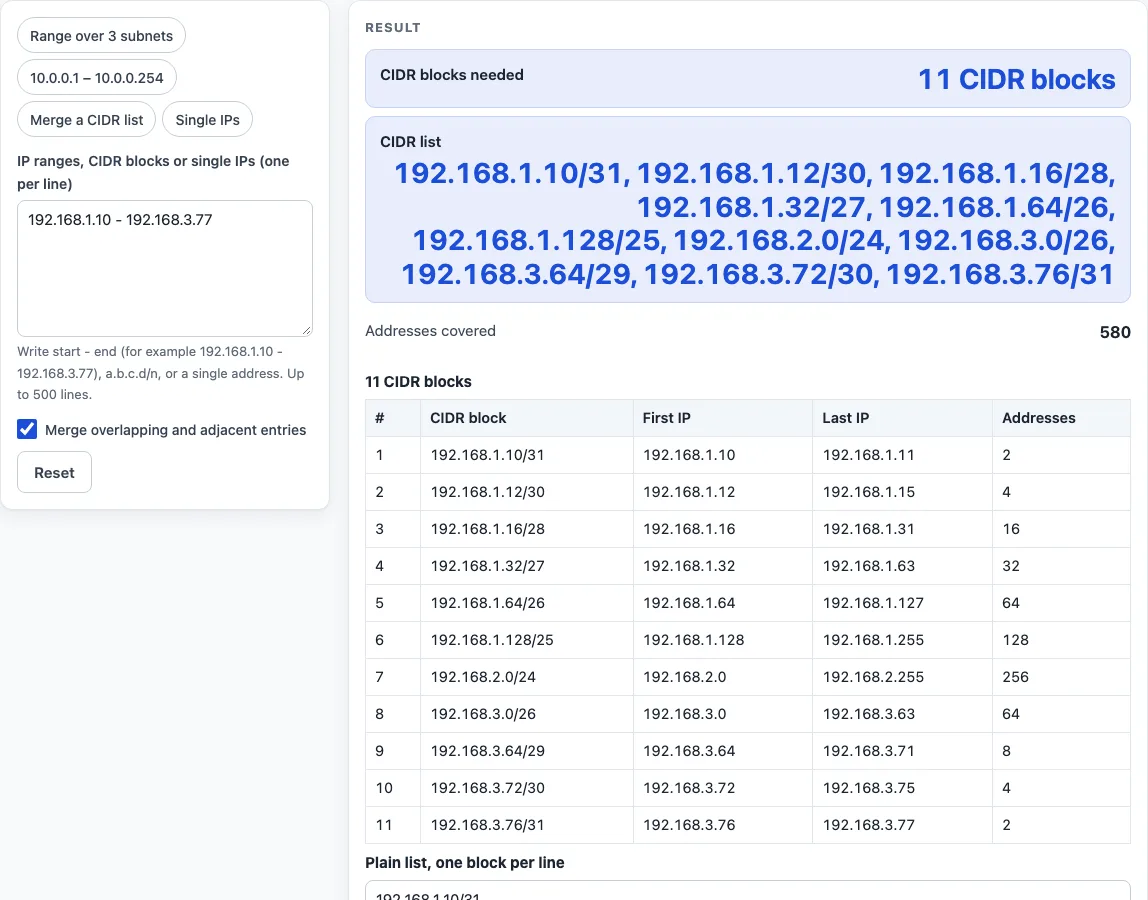
How to use the IP range to CIDR calculator
- Choose a preset button above the form to load a typical case, such as a range over three subnets, 10.0.0.1 - 10.0.0.254, a CIDR list to merge, or four single IPs. You can also type your own input.
- Enter one entry per line. A line can be a range written as
start - end(a hyphen, an en dash or the word “to” all work), a CIDR block such as10.0.0.0/24, an address with a mask, or a single IP address. Commas and semicolons also separate entries. You can enter up to 500 lines. - Leave “Merge overlapping and adjacent entries” on to join all lines into the smallest set of ranges first. Turn it off to convert each line on its own.
- Read the number of CIDR blocks, the list and the number of addresses covered. The main answer shows the first 40 blocks and says how many more there are.
- Open the table for every block, with its CIDR, first IP, last IP and address count.
- Open “How it was calculated” to see the first range’s blocks worked out one by one.
Use Copy result to copy the result lines with a link. Copy link copies the page address, which stores every input in the ?s= part of the URL, so the same calculation reopens later or can be sent to a colleague. Print / save as PDF prints a one-page record with the inputs, results, steps and date. Reset restores the starting example.
How do you calculate CIDR from an IP range?
To calculate CIDR from an IP range, start at the first address, take the largest block that begins there, has a size that is a power of two, and does not pass the last address. Then repeat from the next address until the whole range is covered. This is the aggregation method described in RFC 4632, section 3.
Each block must start on a boundary that matches its size. A block of two addresses must start on an even address, a block of four on a multiple of four, and so on. That rule explains why the blocks are uneven. The address 192.168.1.10 is not a multiple of 4, so it cannot start a /30, but it can start a /31 (addresses .10 and .11). Working through 192.168.1.10 - 192.168.3.77 this way gives 11 blocks covering 580 addresses, from 192.168.1.10/31 to 192.168.3.76/31.
A range that starts and ends on clean boundaries needs far fewer blocks. The range 10.0.0.0 - 10.0.0.255 is the single block 10.0.0.0/24. The range 10.0.0.1 - 10.0.0.254 needs 14 blocks, because the first and last addresses each need a small block of their own.
With “Merge overlapping and adjacent entries” on, all lines are first joined into the smallest set of ranges. For example, 10.0.0.0/24, 10.0.1.0/24, 10.0.2.0/24, 10.0.3.0/24 and 10.0.2.128/25 merge into the single block 10.0.0.0/22, which covers 1,024 addresses.
Why not just use one bigger block?
A single CIDR block always covers a power-of-two number of addresses starting on its own boundary. 192.168.1.10 - 192.168.3.77 has 580 addresses, so the nearest single block, 192.168.0.0/22, would cover 1,024 addresses — 444 of them outside your range. In a firewall rule or a route that means letting in or sending traffic you did not intend, which is why the exact list is longer.
The largest possible answer is 0.0.0.0 - 255.255.255.255, which is 0.0.0.0/0 and covers 4,294,967,296 addresses. The range 0.0.0.1 - 255.255.255.254 needs 62 blocks.
Inputs are checked as you type. If the start is higher than the end, the two are swapped and a warning says so. A CIDR line with host bits set, such as 10.1.2.3/24, is converted to its network, 10.1.2.0/24, with a warning. Errors name the line that caused them.
Worked examples
| Input | Result |
|---|---|
| 192.168.1.10 - 192.168.3.77 | 11 blocks, 580 addresses: 192.168.1.10/31, 192.168.1.12/30, 192.168.1.16/28, 192.168.1.32/27, … |
| 10.0.0.0 - 10.0.0.255 | 1 blocks, 256 addresses: 10.0.0.0/24 |
| 172.16.0.1 - 172.16.0.254 | 14 blocks, 254 addresses: 172.16.0.1/32, 172.16.0.2/31, 172.16.0.4/30, 172.16.0.8/29, … |
| 5 entries | 1 blocks, 1,024 addresses: 10.0.0.0/22 |
| 4 entries | 1 blocks, 4 addresses: 203.0.113.4/30 |
Calculated by the tool above with these values.
Frequently asked questions
Is the calculator free, and is anything I type uploaded?
Yes, the calculator is free, and nothing you type is uploaded. Every calculation runs in your browser, and there is no account or sign-up. Results may be used in any work, including commercial reports, theses and client projects, without attribution.
Can I calculate CIDR from a subnet mask?
Yes. Type the address with its mask, such as 10.0.0.0 255.255.252.0, and the calculator returns the CIDR block 10.0.0.0/22. For a single address and mask the CIDR prefix is simply the number of 1-bits in the mask.
Does merging change which addresses are covered?
No. Merging joins overlapping and adjacent entries into the smallest set of ranges, so the same addresses are covered with fewer blocks. Turn the option off if you want each line converted on its own.
What happens if the start address is higher than the end?
The calculator swaps the two addresses and shows a warning that says so. The result is calculated for the corrected range.
Why did my CIDR line change to a different network address?
If a CIDR line has host bits set, such as 10.1.2.3/24, the calculator converts it to the network address 10.1.2.0/24 and shows a warning. The network address is the first address of the block.
How many lines can I enter, and why does the list look short?
You can enter up to 500 lines. The main answer shows only the first 40 blocks and says how many more there are. The table lists every block, and the plain text box holds the full list.
Can I print or share a calculation?
Yes. Print / save as PDF prints a one-page record with the inputs, results, calculation steps and date. Copy link copies a page address that stores every input, so the calculation reopens later or can be sent to a colleague.
Can I use the results in a live network?
Check them first. The results are calculated from the values you enter, so compare them with your network design and device documentation before you change a live configuration.
Related tools
- Subnet calculator - use it when you need the network, broadcast and host range for one subnet.
- Subnet mask calculator - use it when you have a prefix length and need the dotted-decimal mask.
- CIDR calculator - use it when you start from a single CIDR block and want its address count and range.
- Subnet cheat sheet - use it for a quick reference of prefix lengths and block sizes.
- Wildcard mask calculator - use it when an access list or firewall rule needs a wildcard mask.
- IP to binary converter - use it to see the bits of an address, which shows why a block must start on a boundary.