IP to Binary Converter
Type an IPv4 address or 32 bits to convert between dotted decimal and binary, with the place-value table.
Recent
Your last 10 settings, saved only in this browser. Nothing is uploaded.
This IP to binary converter turns a dotted IPv4 address into 32 binary digits, and binary back into an IP address. For example, 11000000.00000000.00000010.00000001 becomes 192.0.2.1. It also works in reverse, so it doubles as a convert IP address to binary calculator: type a dotted address and get its 32-bit binary form. Each result includes the decimal and hexadecimal values, a table of place values, and the steps for each octet. An optional prefix length shows which bits belong to the network and which belong to hosts. The calculator runs in your browser, is free, and needs no sign-up.
It is handy for subnetting homework, where masks and addresses are compared bit by bit.
How to use the IP to binary converter
- Choose a direction. Select “IP address to binary” to convert a dotted address, or “Binary to IP address” to convert bits.
- Enter your value. In IP address mode, type four numbers from 0 to 255 separated by dots, such as 192.0.2.1. In binary mode, type exactly 32 digits of 0 and 1. Dots, spaces, underscores or dashes between groups are allowed.
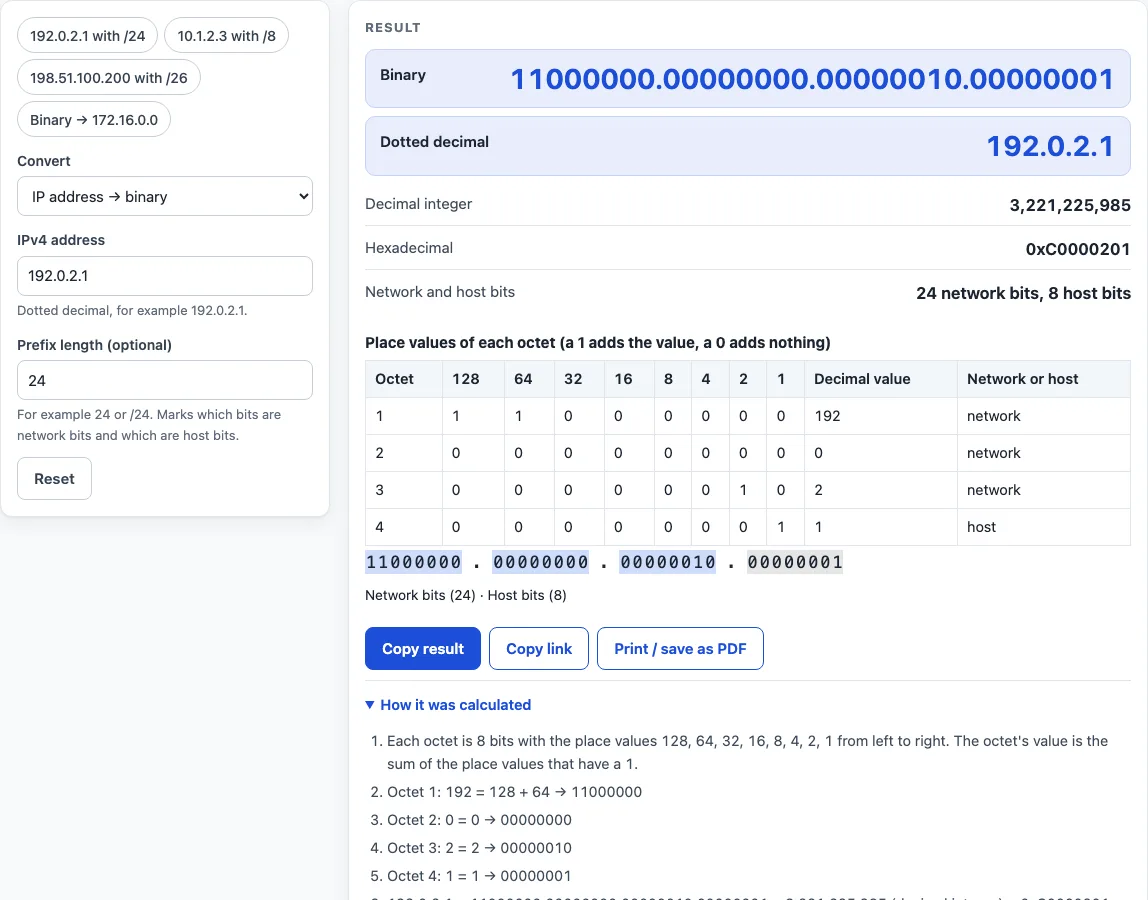
- Read the result. It updates as you type. You will see the binary with dots, the dotted decimal, the decimal integer and the hexadecimal value with a 0x prefix.
- Check the table. Each octet has columns for 128, 64, 32, 16, 8, 4, 2 and 1, with a 1 or 0 under each, plus the octet’s decimal value.
- Add a prefix length if needed. Enter a whole number from 0 to 32, with or without the slash (24 or /24). The table gets a network or host column, and the result shows how many network and host bits there are.
- Open “How it was calculated” under the result to see the formula, the values substituted and the answer.
Preset buttons above the form load typical cases: 192.0.2.1 with /24, 10.1.2.3 with /8, 198.51.100.200 with /26, and the binary value of 172.16.0.0 with /12. “Reset” restores the starting example.
Example: 192.0.2.1 becomes 11000000.00000000.00000010.00000001, decimal 3,221,225,985 and hex 0xC0000201.
Copy link and Print / save as PDF keep a record of the conversion.
How do you convert binary to an IP address?
Split the 32 bits into four groups of eight, reading from left to right. Each group is one octet, and its value is the sum of the place values 128, 64, 32, 16, 8, 4, 2 and 1 wherever the bit is 1. For example, 11000000 = 128 + 64 = 192. Repeat this for each group and join the results with dots to get 192.0.2.1.
Converting the other way runs the same sum backwards. Start with 192, find the place values that add up to it (128 + 64), and set those bits to 1. The bit string for 172.16.0.0 is 10101100000100000000000000000000, which is 10101100 00010000 00000000 00000000 split into octets.
What do the place values 128 to 1 mean?
Each place value is a power of two, from 2 to the power 7 on the left down to 2 to the power 0 on the right. A 1 means add that value, and a 0 means skip it. Eight bits can represent any number from 0 to 255, which is why each octet must fall in that range.
The four octets together form one 32-bit number. The whole address can therefore be written as a single decimal integer or a hexadecimal value. For example, 192.0.2.1 is decimal 3,221,225,985 and hex 0xC0000201. The smallest address, 0.0.0.0, is 0x00000000, and the largest, 255.255.255.255, is 0xFFFFFFFF.
What does the prefix length change?
The prefix length says how many of the leading bits form the network part of the address. The remaining bits identify hosts on that network. The value must be a whole number from 0 to 32.
A /8 prefix makes the first octet network and the other three host. A /32 makes all four octets network, and a /0 makes all four host. With /26, the fourth octet has 2 network bits and 6 host bits, because 24 + 2 = 26. The bit strip colours network and host bits differently, so the split is easy to see. The 32-bit four-octet format comes from RFC 791 section 3.2, and the prefix length concept comes from RFC 4632 section 3.1.
Worked examples
| Input | Result |
|---|---|
| 192.0.2.1 | 11000000.00000000.00000010.00000001 (3,221,225,985) |
| 10.1.2.3 | 00001010.00000001.00000010.00000011 (167,838,211) |
| 198.51.100.200 | 11000110.00110011.01100100.11001000 (3,325,256,904) |
| 10101100.00010000.00000000.00000000 | 172.16.0.0 (2,886,729,728) |
| 11001011.00000000.01110001.11111111 | 203.0.113.255 (3,405,804,031) |
Calculated by the tool above with these values.
Frequently asked questions
Is the calculator free, and is anything I type uploaded?
Yes, the calculator is free, and there is no account or sign-up. Everything is calculated in your browser, and nothing you type is uploaded.
Can I print or share a calculation?
Yes. “Print / save as PDF” produces a one-page record with the inputs, results, calculation steps and date. “Copy link” copies a page address that stores every input in the ?s= part of the URL, so the same calculation reopens later or can be sent to a colleague. “Copy result” copies the result lines with a link.
Why does the calculator reject 192.000.2.1?
Leading zeros make an address ambiguous, so the calculator accepts only four plain numbers from 0 to 255. Enter 192.0.2.1 instead.
What happens if my binary string is not 32 digits?
The converter shows an error that states how many bits you entered. Only the digits 0 and 1 are valid, and separators such as dots, spaces, underscores and dashes are ignored between groups.
Can I use the results in my own work?
Yes. Results may be used in any work, including commercial reports, theses and client projects, without attribution. Check results against your network design and device documentation before you change a live configuration.
Related tools
- Subnet calculator - use it to work out network, broadcast and host ranges for a given address and prefix.
- Subnet mask calculator - use it when you need the dotted subnet mask that matches a prefix length.
- CIDR calculator - use it to convert between CIDR notation and address counts.
- IP range to CIDR converter - use it when you have a start and end address and need the matching CIDR blocks.
- Subnet cheat sheet - use it as a quick reference for common prefix lengths and their sizes.
- Wildcard mask calculator - use it to find the inverse mask used in access control lists.
- MAC address lookup - use it to identify the manufacturer behind a hardware address.
- Private IP address ranges - use it to check which address blocks are reserved for private networks.
- IPv6 address format and examples - use it when you work with 128-bit IPv6 addresses instead of IPv4.