IPv6 Example Address and Format Checker
Generate documentation-safe IPv6 sample addresses of every type, or paste addresses to validate, compress and expand them.
Recent
Your last 10 settings, saved only in this browser. Nothing is uploaded.
How to use the IPv6 example address calculator
- Choose a mode: Check and format addresses or Generate example addresses.
- In check mode, paste your addresses into the input box, one per line. Blank lines are skipped. Any line after the 200th is ignored, and a warning appears.
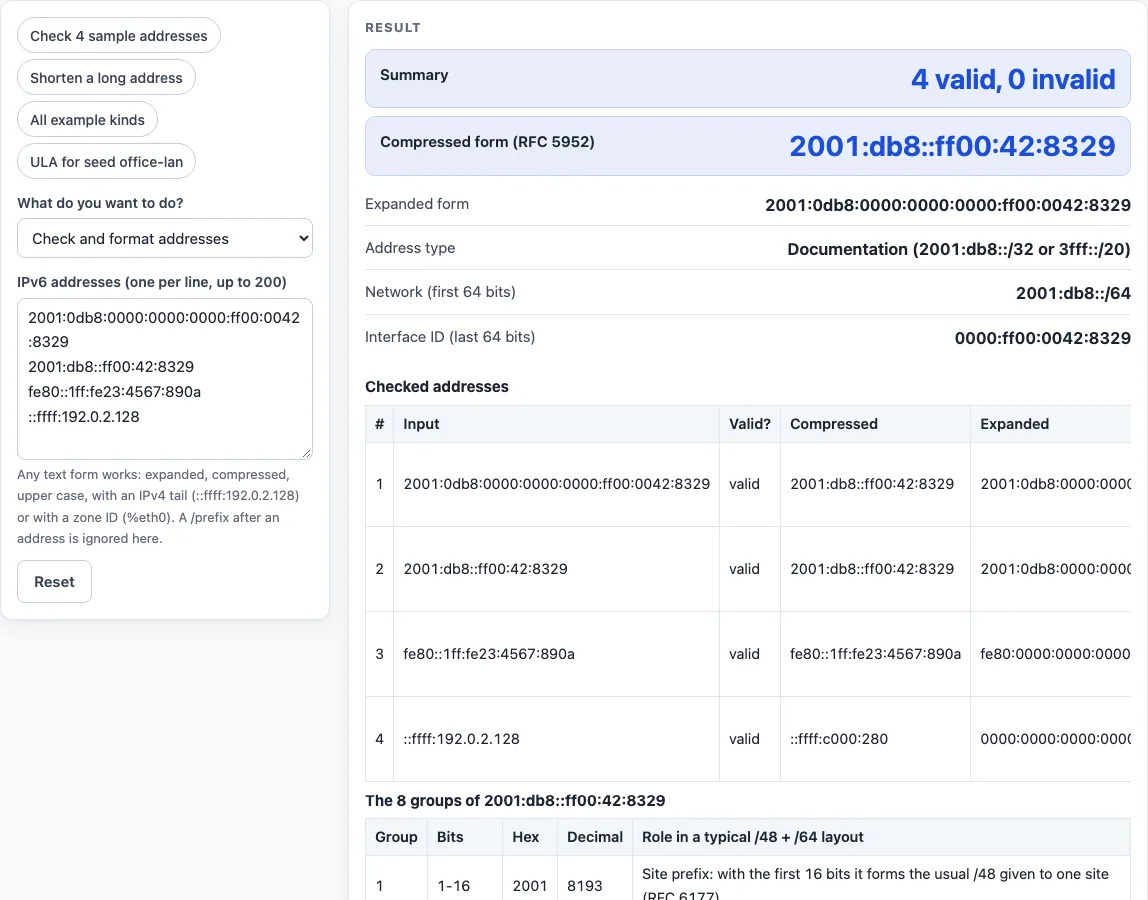
- Read the result for each line. It shows whether the address is valid (with the reason if not), its compressed form, its expanded form and its address type.
- For the first valid address, check the table of its 8 groups and its split into a /64 network and a 64-bit interface ID.
- In generate mode, choose one kind of address or all six.
- Enter a seed, or keep the default
example. The same seed always gives the same addresses. - Use the preset buttons above the form to load typical cases. Select Reset to restore the starting example.
The result updates as you type, and How it was calculated shows the formula, the values used and the answer. Copy result, Copy link, Print / save as PDF and Reset are all below the result.
Example: paste 2001:0db8:0000:0000:0000:ff00:0042:8329 and the checker returns the compressed form 2001:db8::ff00:42:8329, its expanded form and the type global unicast (documentation prefix).
Copy link keeps the pasted list or seed so the same check reopens later.
What is the IPv6 address format?
An IPv6 address is 128 bits written as eight groups of four hexadecimal digits separated by colons, for example 2001:0db8:0000:0000:0000:ff00:0042:8329 (RFC 4291). Two shortening rules make it readable: leading zeros in a group can be dropped, and one run of all-zero groups can be replaced by “::”. The same address is therefore normally written 2001:db8::ff00:42:8329. RFC 5952 fixes one canonical text form: lower-case hex, the longest run of zero groups compressed (the leftmost if two runs tie), and a single zero group written as 0 rather than “::”.
IPv6 example addresses by type
| Type | Example | Range |
|---|---|---|
| Documentation (global unicast) | 2001:db8::1 | 2001:db8::/32 (RFC 3849) |
| Link-local | fe80::1 | fe80::/10 |
| Unique local (ULA) | fd12:3456:789a:1::1 | fc00::/7, in practice fd00::/8 (RFC 4193) |
| Loopback | ::1 | ::1/128 |
| Unspecified | :: | ::/128 |
| IPv4-mapped | ::ffff:192.0.2.1 | ::ffff:0:0/96 |
Use the 2001:db8:: documentation prefix for any IPv6 sample address in manuals, slides or tests, just as 192.0.2.0/24 is used for IPv4: it is never routed on the internet, so a copied example can never hit a real host.
How do I write an IPv6 address with a port or in a URL?
Put the address in square brackets, as in https://[2001:db8::1]:8443/, because the colons inside an IPv6 address would otherwise be confused with the port separator (RFC 3986). The checker accepts bracketed input and removes the brackets before it validates the address.
Which IPv6 example addresses should never be used?
Do not copy addresses from real networks into manuals or tests, and do not invent prefixes such as 1234::/16 — they may be assigned to someone. Use 2001:db8::/32 (or 3fff::/20, added for documentation in RFC 9637) for global examples, fe80:: for link-local and fd00::/8 with a random global ID for private lab networks.
Worked examples
| Input | Result |
|---|---|
| 4 addresses pasted | 4 valid, 0 invalid; first: 2001:db8::ff00:42:8329 |
| 3 addresses pasted | 3 valid, 0 invalid; first: 2001:db8::8:800:200c:417a |
| 3 addresses pasted | 3 valid, 0 invalid; first: fd12:3456:789a:1::1 |
| Generate: Unique local address (fd00::/8), seed office-lan | fda4:6074:f63f:1::1 |
| Generate: All kinds, seed example | 6 example address(es) |
Calculated by the tool above with these values.
Frequently asked questions
Is the IPv6 example address calculator free, and is anything I type uploaded?
Yes, the calculator is free, and there is no account or sign-up. Everything is calculated in your browser, and nothing you type, including pasted addresses, is uploaded or sent anywhere.
Results may be used in any work, including commercial documentation and training material, without attribution.
Can I print or share a calculation?
Yes. The calculator stores every input in the ?s= part of the page address, so a link rebuilds the same calculation without any saved record on a server. Anyone who receives the link can see the addresses you pasted, so share it only with people who should see them.
Sharing a seed lets someone reproduce the exact same generated example addresses. The printed PDF is a one-page record with the inputs, results, calculation steps and the date, which makes it useful for documenting a lab or a design review.
What does RFC 5952 compression do to an IPv6 address?
It writes the address in lower case, removes leading zeros from each group, and replaces the longest run of zero groups (at least two) with ::. If two runs are the same length, the leftmost one is replaced. For example, 2001:db8:0:0:1:0:0:1 becomes 2001:db8::1:0:0:1.
Why do the example addresses start with 2001:db8?
2001:db8::/32 is reserved for documentation by RFC 3849. It is never routed on the internet, so an example from this range will not reach a real host.
Why does an address show as invalid?
The result gives the reason. Common causes are an illegal character, colons in the wrong place (:: used more than once, or three colons in a row), a group that is not 1 to 4 hex digits, the wrong number of groups, or a bad IPv4 tail.
Which part of an IPv6 address is the network and which is the host?
The first 64 bits (groups 1 to 4) form the /64 network, and the last 64 bits (groups 5 to 8) form the interface ID. In the default example, 2001:db8::ff00:42:8329 has network 2001:db8::/64 and interface ID 0000:ff00:0042:8329.
Why is there a warning about the ULA Global ID?
A Global ID derived from a typed seed is fine for examples and labs. Real networks should choose random bits instead, as described in RFC 4193 section 3.2.2, so that two sites do not end up with the same prefix.
Can I use the example addresses on a live network?
The examples are meant for documentation, labs and tests. Before you change a live configuration, check the results against your network design and device documentation.
Related tools
- IPv6 subnet calculator: Use it to work out the address range, prefix size and number of subnets for an IPv6 block.
- IPv6 subnet cheat sheet: Use it when you want a quick reference for common IPv6 prefix lengths.
- Private IP address ranges: Use it to check which IPv4 ranges are reserved for private networks.
- MAC address lookup: Use it to identify the manufacturer behind a MAC address.
- Subnet calculator: Use it to work out network, broadcast and host details for an IP address and mask.
- IP to binary converter: Use it to see an IP address in binary form.
- CIDR calculator: Use it to convert a CIDR prefix into a subnet mask and host count.