IPv6 Subnet Calculator
Enter an IPv6 address with its prefix to get the network, address range, exact size and how many /64 subnets it holds.
Recent
Your last 10 settings, saved only in this browser. Nothing is uploaded.
The IPv6 subnet calculator takes one IPv6 address with a prefix length, such as 2001:db8:abcd:12::1/64, and works out the network it belongs to. It shows the network prefix, the first and last address, and the exact total number of addresses in that prefix. It can also split a prefix into smaller subnets for planning. It is a free IPv6 (ip6) subnet mask and netmask calculator that runs in your browser, with no sign-up. You can enter addresses in compressed, expanded, upper-case, lower-case, bracketed or IPv4-mapped form. For IPv4 networks, use the subnet calculator on the home page instead.
Every number is exact: IPv6 sizes are computed with 128-bit integer arithmetic, not rounded floating-point values.
How to use the IPv6 subnet calculator
- Type an IPv6 address into the address box. Compressed (2001:db8::1), fully expanded, bracketed, and mixed forms such as ::ffff:192.0.2.1 all work. Leading and trailing spaces are ignored.
- Add a prefix length after a slash, for example /64. If you leave it out, the address is treated as a single address (/128) and a warning asks you to add /n.
- If your address includes a zone ID such as %eth0, the calculator removes it before the maths and shows a warning.
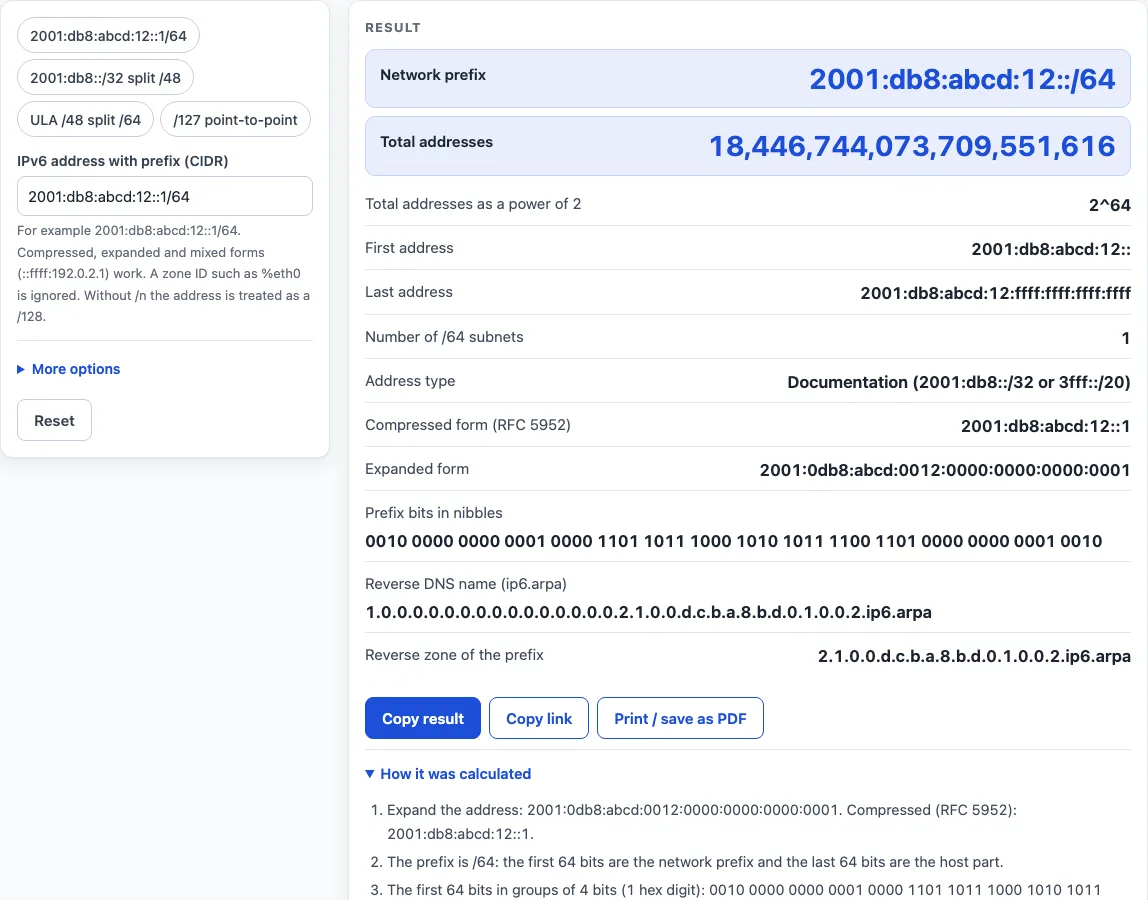
- Read the primary results: the network prefix in compressed form and the total number of addresses, shown with thousands separators and as 2^n.
- Scroll down to the other outputs: first and last address, expanded and compressed forms, address type, the prefix bits in groups of 4, and the reverse DNS name (ip6.arpa). The results update as you type.
- Open “How it was calculated” under the result to see the formula, the values it used and the answer.
- To split the prefix, open the advanced option “Split into /n subnets” and enter a longer prefix length, such as 48 for 2001:db8::/32. Use a whole number from your prefix length up to 128. The page then gives the number of subnets and a table of the first 256, with the subnet, first address and last address for each row.
The preset buttons above the form load typical cases, including 2001:db8:abcd:12::1/64 and 2001:db8::/32 split into /48. Reset restores the starting example.
How do you calculate an IPv6 subnet?
An IPv6 address has 128 bits, written as eight groups of four hex digits. The prefix length, such as /64, says how many leading bits identify the network. The remaining bits are host bits. The network address is the address with all host bits cleared. If the address you type has host bits set, as 2001:db8:abcd:12::1/64 does, the calculator clears them for you. The last address is the network with every host bit set to 1.
How many addresses are in an IPv6 prefix?
The total number of addresses is 2 raised to the number of host bits. A /64 therefore holds 2^64 addresses, which is 18,446,744,073,709,551,616. IPv6 has no broadcast address, so the highest address is an ordinary address and counts in the total. A prefix length works like a subnet mask: /64 matches the mask ffff:ffff:ffff:ffff::, so this also works as an ipv6 netmask calculator.
Why do IPv6 subnets end on multiples of 4 bits?
Each hex digit holds 4 bits, which is why the calculator shows the prefix in groups of 4 bits. The reverse DNS zone appears only when the prefix ends on a multiple of 4. When you split a prefix, the number of subnets is 2 raised to the difference between the new length and the old one. For 2001:db8::/32 split into /48, that is 2^16, or 65,536 subnets; a /48 split into /64 subnets gives 65,536 LANs. Choosing prefix lengths on 4-bit boundaries (/48, /52, /56, /60, /64) keeps every subnet on a whole hex digit, so addresses stay readable and reverse DNS delegation is simple.
What is the reverse DNS name of an IPv6 address?
Reverse DNS for IPv6 uses the ip6.arpa domain with every hex digit of the expanded address written in reverse order, separated by dots (RFC 3596). The calculator shows the full name for the address you typed and, when the prefix ends on a 4-bit boundary, the zone that covers the whole prefix.
Worked examples
| Input | Result |
|---|---|
| 2001:db8:abcd:12::1/64 | 2001:db8:abcd:12::/64, 2^64 addresses, Documentation (2001:db8::/32 or 3fff::/20) |
| 2001:db8::/32, split into /48 | 2001:db8::/32, 2^96 addresses, Documentation (2001:db8::/32 or 3fff::/20) |
| fd12:3456:789a::/48, split into /64 | fd12:3456:789a::/48, 2^80 addresses, Unique local address, ULA (fc00::/7) |
| 2001:db8:0:1::5/127 | 2001:db8:0:1::4/127, 2^1 addresses, Documentation (2001:db8::/32 or 3fff::/20) |
| ::ffff:192.0.2.1 | ::ffff:c000:201/128, 2^0 addresses, IPv4-mapped address (::ffff:0:0/96) |
Calculated by the tool above with these values.
Frequently asked questions
Is the IPv6 subnet calculator free, and is anything I type uploaded?
Yes, the calculator is free, and nothing you type is uploaded. All the calculations run in your browser, and there is no account or sign-up. Results may be used in any work, including commercial reports, theses and client projects, without attribution.
The page reminds you that results are calculated in your browser from the values you enter. Check them against your network design and device documentation before you change a live configuration.
Can I print or share an IPv6 subnet calculation?
Yes. “Print / save as PDF” creates a one-page record with the inputs, the results, the calculation steps and the date. “Copy link” copies the page address, which stores every input in the ?s= part of the URL. Anyone who opens that link sees the same calculation, so you can reopen it later or send it to a colleague. “Copy result” copies the result lines with a link, which is useful for pasting into a ticket or document.
What happens if I leave out the /prefix?
The calculator treats the address as a single address, which is the same as a /128 prefix. A warning asks you to add /n. Type the prefix length you actually use, such as /64, to get the network and address range.
Why does the calculator remove my zone ID?
A zone ID such as %eth0 names a local interface, not part of the address itself. The calculator removes it before the maths and shows a warning that says so.
Why is the network address different from the address I typed?
The network address is the typed address with all host bits cleared. For example, 2001:db8:abcd:12::1/64 gives the network 2001:db8:abcd:12::/64.
Why does my split show an error?
The split length must be a whole number from your prefix length up to 128. A value shorter than the prefix, or one above 128, produces an error. Enter a longer prefix length, such as 48 for a /32, to get the subnet table.
Why does the calculator warn about /127 and about prefixes longer than /64?
A /127 is meant for point-to-point links, as described in RFC 6164. Prefixes longer than /64 and shorter than /127 break SLAAC and the standard 64-bit interface IDs on ordinary LANs, as described in RFC 4862 and RFC 4291. The warnings are there to help you avoid those problems.
Are the results checked against a standard library?
Yes. The results are checked against Python’s ipaddress module, using ip_network with strict=False and its address, count, exploded, compressed, reverse_pointer and subnets properties.
Related tools
- IPv6 address format and examples: use this when you need to read or write IPv6 addresses correctly before calculating a subnet.
- IPv6 subnet cheat sheet: use this for quick reference tables of common prefix lengths and their sizes.
- Private IP address ranges: use this to check which IPv4 ranges are reserved for private networks.
- MAC address lookup: use this to identify the manufacturer behind a MAC address, which is a separate task from subnetting.
- Subnet calculator: use this for IPv4 network calculations.
- Subnet cheat sheet: use this for quick reference on IPv4 subnet sizes and masks.