IPv6 Subnet Cheat Sheet
Look up any IPv6 prefix length: addresses, /64 networks, /48 sites and its documented use, and see how many of one fit in another.
Recent
Your last 10 settings, saved only in this browser. Nothing is uploaded.
How to use the IPv6 subnet cheat sheet
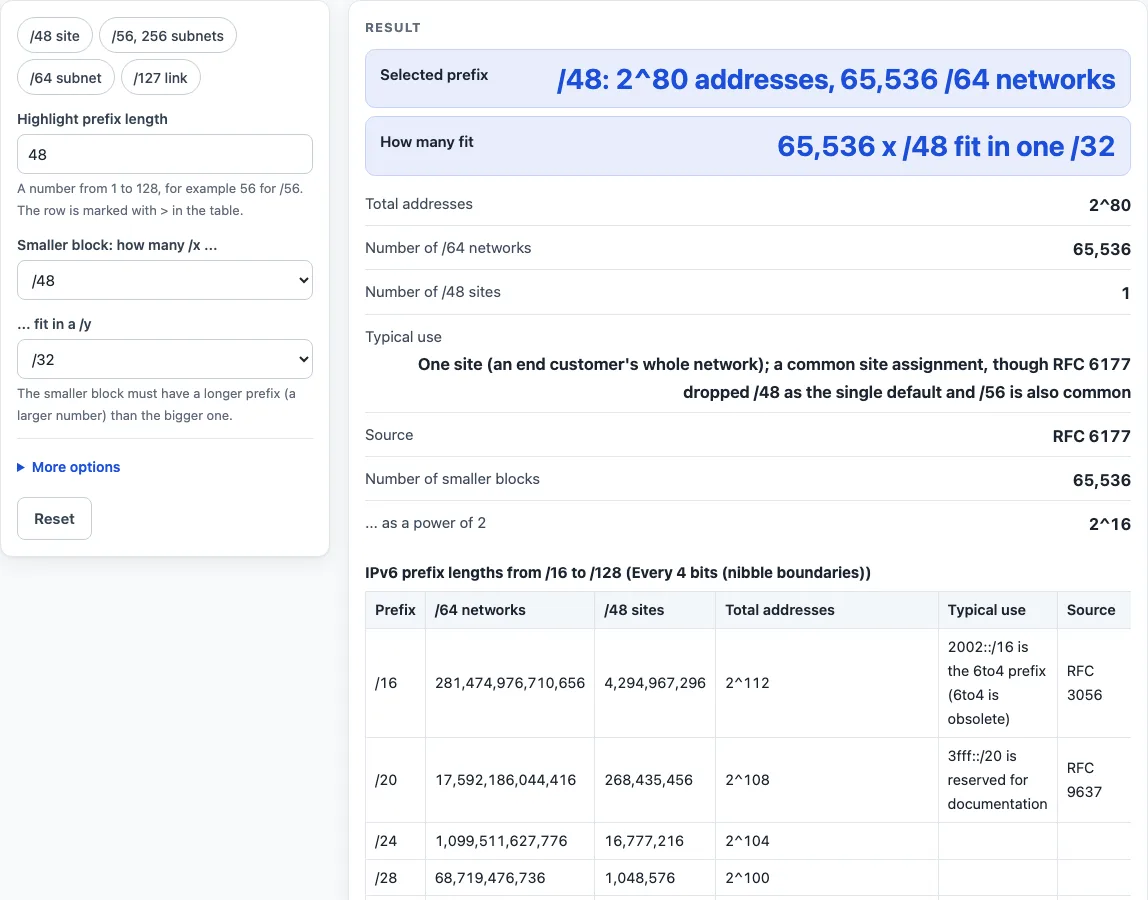
- Choose the row spacing. Pick every 4 bits to show only nibble boundaries (/16, /20, /24 and so on, which line up with the written hex digits), or every bit to list each prefix length.
- Read the table. Each row gives the prefix length, the number of /64 networks, the number of /48 sites, the total addresses and the documented use with its source. Rows with a documented use and the highlighted row always appear, even in 4-bit mode.
- Type a prefix length from 1 to 128 into the highlight prefix length field. The matching row is marked with
>, and a summary appears with total addresses, /64 networks, /48 sites, typical use and source. - Read any warning. A highlight from /65 to /126 is flagged, because SLAAC needs a /64.
- Open the second tool, “how many /x fit in a /y”. Choose the smaller block in the first select and the bigger block in the second. The answer appears as an exact integer and as a power of two.
- Use a preset button above the form to load a typical case, or press Reset to return to the starting example.
The result updates as you type. Under the result, How it was calculated shows the formula, the values substituted and the answer. Some less common inputs sit under More options.
How many addresses does an IPv6 prefix hold?
A prefix of length p leaves 128 − p host bits, so it holds 2^(128 − p) addresses. For example, /64 holds 2^64 = 18,446,744,073,709,551,616 addresses, /127 holds 2, and /128 holds 1.
The tool calculates these values as exact 128-bit integers, so no rounding hides the digits. Because the host part of a /64 is 64 bits, the exact integer is shown alongside the power of two.
How many /64 networks and /48 sites fit in a prefix?
The /64 column uses 2^(64 − p) for prefixes up to /64, and shows a dash for longer prefixes. The /48 column uses 2^(48 − p) for prefixes up to /48. So a /48 holds 65,536 /64 networks, a /56 holds 256, and a /32 holds 4,294,967,296.
These two counts matter because of how IPv6 is assigned. A /48 is one site; RFC 6177 dropped /48 as the single default for every end site, so ISPs commonly give /48 to businesses and /56 to homes. A /64 is one subnet, and it is required for SLAAC and 64-bit interface IDs (RFC 4291, section 2.5.1; RFC 4862).
Which IPv6 prefix lengths have a fixed job?
Some lengths have a documented role. The /16 2002::/16 is the 6to4 prefix (RFC 3056, now obsolete). The /20 3fff::/20 is reserved for documentation (RFC 9637). The /32 is a common initial allocation from a registry to an ISP (RIR policy), and 2001:db8::/32 is for documentation (RFC 3849). The /96 holds IPv4-mapped addresses (RFC 4291, section 2.5.5.2) and the NAT64 prefix 64:ff9b::/96 (RFC 6052). The /127 is for a point-to-point link between two routers (RFC 6164, section 5.1). The /128 is a single host, and ::1/128 is loopback (RFC 4291, section 2.5.3).
For any other length, the table says there is no fixed role instead of assigning one.
Worked examples
| Input | Result |
|---|---|
| /48 highlighted; /48 in /32 | /48: 2^80 addresses, 65,536 /64 networks; 65,536 x /48 fit in one /32 |
| /64 highlighted; /64 in /48 | /64: 2^64 addresses, 1 /64 networks; 65,536 x /64 fit in one /48 |
| /56 highlighted; /64 in /56 | /56: 2^72 addresses, 256 /64 networks; 256 x /64 fit in one /56 |
| /127 highlighted; /127 in /64 | /127: 2^1 addresses, — /64 networks; 9,223,372,036,854,775,808 x /127 fit in one /64 |
| /33 highlighted; /48 in /32 | /33: 2^95 addresses, 2,147,483,648 /64 networks; 65,536 x /48 fit in one /32 |
Calculated by the tool above with these values.
Frequently asked questions
Is the calculator free, and is anything I type uploaded?
Yes, the calculator is free, and nothing you type is uploaded. All calculations run in your browser, and there is no account or sign-up. Results may be used in any work, including commercial reports, theses and client projects, without attribution.
Results are calculated from the values you enter, so check them against your network design and device documentation before you change a live configuration.
Can I print or share a calculation?
Yes. Print / save as PDF produces a one-page record with the inputs, the results, the calculation steps and the date. Copy link stores every input in the ?s= part of the page address, so the same calculation reopens later or can be sent to a colleague.
What does the > mark in the table mean?
It marks the row for the prefix length you typed in the highlight field. The summary above the table gives that row’s total addresses, /64 networks, /48 sites, typical use and source.
Why is my prefix length flagged with a warning?
A highlight from /65 to /126 is flagged, because SLAAC needs a /64 (RFC 4862). A highlight shorter than /16 is summarised but not listed in the table.
What does “no fixed role” mean?
It means the sources used here do not give that prefix length a documented use, so the tool does not assign one. The row still shows its address and network counts.
Related tools
- IPv6 subnet calculator: Use it to work out the network, range and size for one specific IPv6 prefix.
- IPv6 address format and examples: Use it to check how IPv6 addresses are written before you work with prefixes.
- Private IP address ranges: Use it to see which address ranges are reserved for private networks.
- MAC address lookup: Use it to identify the manufacturer behind a hardware address on your network.
- Subnet calculator: Use it to work out subnet sizes and ranges in IPv4 networks.
- Subnet cheat sheet: Use it as a companion reference table of subnet sizes.