MAC Address Lookup (Vendor / OUI)
Paste a MAC address — or up to 1,000 — to see the registered vendor, the block size, the I/G and U/L bits and every format.
Recent
Your last 10 settings, saved only in this browser. Nothing is uploaded.
How to use the MAC address lookup tool
- Click in the text box and type or paste a MAC address. For a bulk check, put one address on each line, up to 1,000 lines.
- Use any accepted format: colon (00:00:0C:12:34:56), dash (00-00-0C-12-34-56), Cisco dotted (0000.0c12.3456) or no separator (00000C123456). Upper and lower case both work, and so do a bare 6-digit OUI and a 16-digit EUI-64 identifier.
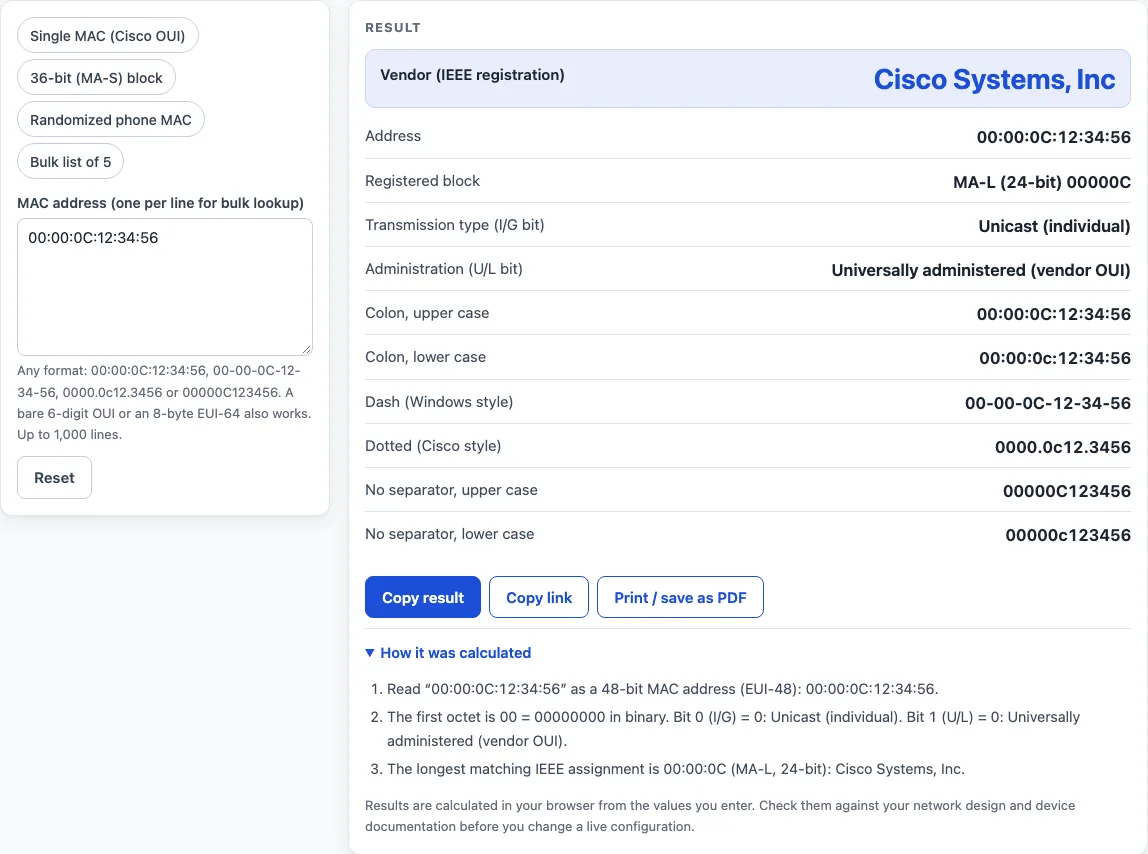
- Read the result as you type. One line shows a detail view with Vendor, Address, Registered block, Transmission type and Administration, plus six format variants.
- Check the Registered block row. It shows which block size matched, such as “MA-S (36-bit) 8C1F64:AFA”.
- Open “How it was calculated” under the result to see the formula, the values substituted and the answer.
- For two or more lines, read the bulk table. Its columns are MAC address, Vendor, Block, Unicast / multicast and Universal / local. A line that is not valid shows “Not a valid MAC address” and is skipped.
The preset buttons above the form load typical cases: Single MAC (Cisco OUI), Randomized phone MAC, 36-bit (MA-S) block and Bulk list of 5. Reset restores the starting example. If you are new to a mac address finder, start with the Cisco OUI preset to see what a matched result looks like before you enter your own addresses.
What does a MAC address lookup actually find?
A lookup finds the organization that registered the address block. The first 24 bits, called the OUI, are assigned by IEEE to organizations. Some blocks are longer: MA-M uses 28 bits, and MA-S and the retired IAB use 36 bits. The longest matching assignment wins, so a 36-bit MA-S block beats a 28-bit MA-M block, which beats the 24-bit MA-L OUI. For example, 8C:1F:64:AF:A1:23 matches the MA-S block 8C1F64:AFA, owned by DATA ELECTRONIC DEVICES, INC, even though the 24-bit prefix 8C1F64 alone belongs to IEEE Registration Authority.
What do the I/G and U/L bits in a MAC address mean?
They are the two lowest bits of the first octet. Bit 0 is the I/G bit: 0 means unicast (individual) and 1 means multicast (group). Bit 1 is the U/L bit: 0 means universally administered, assigned from a manufacturer’s OUI, and 1 means locally administered. The first octet 8C is 10001100 in binary, so its I/G bit is 0 and its U/L bit is 0. An address whose first octet has the second hex digit 2, 6, A or E is locally administered unicast.
Why does a locally administered MAC address have no vendor?
A locally administered address is set by the device or software rather than taken from a manufacturer’s OUI, so no registry can name an owner. Phones and laptops often use randomized private Wi-Fi addresses, and many virtual machines do the same. The tool shows “Locally administered — no vendor” with a warning and does not run a lookup. For 02:00:00:AB:CD:EF, the first octet 02 is 00000010, so its U/L bit is 1.
Why does a multicast MAC address still resolve to a vendor?
The registry lists each OUI in its individual form, so the tool clears the I/G bit before it searches. The IPv4 multicast address 01:00:5E:00:00:01 becomes 00:00:5E:00:00:01 and resolves to ICANN, IANA Department. The address ff:ff:ff:ff:ff:ff is reported as broadcast instead of being looked up.
Why does a lookup sometimes return a warning instead of a vendor?
Three cases give a warning. If the prefix is missing from the listing, the result is “Not registered in the IEEE public listing”. If the owner is listed as Private, the block size is shown but the name is not. If you enter only a bare 24-bit OUI that IEEE has split into smaller blocks, you are asked to enter the full address. Every bare OUI also carries a warning that only 24 bits were given.
Worked examples
| Input | Result |
|---|---|
| 00:00:0C:12:34:56 | Cisco Systems, Inc |
| C8-5C-E2-7A-BC-DE | SYNERGY SYSTEMS AND SOLUTIONS |
| 02:00:00:ab:cd:ef | Locally administered — no vendor |
| 3c5a.b4aa.bbcc | Google, Inc. |
| 4 MAC addresses, one per line | 2 of 4 lines matched a registered vendor |
Calculated by the tool above with these values.
Frequently asked questions
Is this MAC address lookup tool free, and is anything I type uploaded?
Yes, the tool is free, and nothing you type is uploaded. Lookups run in your browser, and the MAC addresses you enter are not sent anywhere. There is no account or sign-up. The page downloads only the vendor data it needs, the largest file being about 610 KB uncompressed, and keeps it for your visit. That download is the public listing, not your input. Results may be used in any work, including commercial reports, theses and client projects, without attribution.
Can I print or share a MAC address lookup result?
Yes. “Print / save as PDF” produces a one-page record with the inputs, results, calculation steps and the date. “Copy result” copies the result lines with a link. “Copy link” copies the page address, which stores every input in the ?s= part of the URL, so the same lookup reopens later or can be sent to a colleague.
Does the lookup show the device model?
No. The vendor is the organization that registered the address block. Chips and modules are often made by another company and sold under a different brand.
Why does my address say “Not registered in the IEEE public listing”?
The prefix is not in the listing. The address may be unassigned, mistyped, or used by a vendor that never registered it. Check the address against the device label first.
Why do I see “Not a valid MAC address”?
That line has the wrong length, non-hex characters or odd groupings. In bulk mode the line is skipped, and in single mode you get an error. Correct the line and the result updates.
What happens if I type only the first six digits?
The tool accepts a bare 6-digit OUI and always adds a warning that only 24 bits were given. If that prefix belongs to a smaller MA-M or MA-S block, enter the full MAC address to find the actual owner.
Why does my phone’s address show “Locally administered — no vendor”?
Phones and laptops often use a randomized private Wi-Fi address, which the device creates itself. No manufacturer can own it, so no vendor is shown.
What does “Private registration” mean?
The owner has asked IEEE not to publish its name, so the tool cannot show it. The block size is still shown, with a warning.
Related tools
- IPv6 subnet calculator: use it to divide an IPv6 prefix into subnets once you know the device addressing plan.
- IPv6 address format and examples: use it to see how IPv6 addresses are written and abbreviated.
- IPv6 subnet cheat sheet: use it for a quick reference of common IPv6 prefix sizes.
- Private IP address ranges: use it to check which IPv4 addresses are reserved for private networks.
- Subnet calculator: use it to work out network, host and broadcast addresses for an IPv4 subnet.
- IP to binary converter: use it to see the bit pattern of an IP address, the same kind of bit reading used for MAC addresses.
- CIDR calculator: use it to convert between CIDR prefix lengths and subnet masks.