Mbps to MB/s Converter
Convert megabits per second to megabytes per second, convert data sizes, and see how long a file takes at your link speed.
Recent
Your last 10 settings, saved only in this browser. Nothing is uploaded.
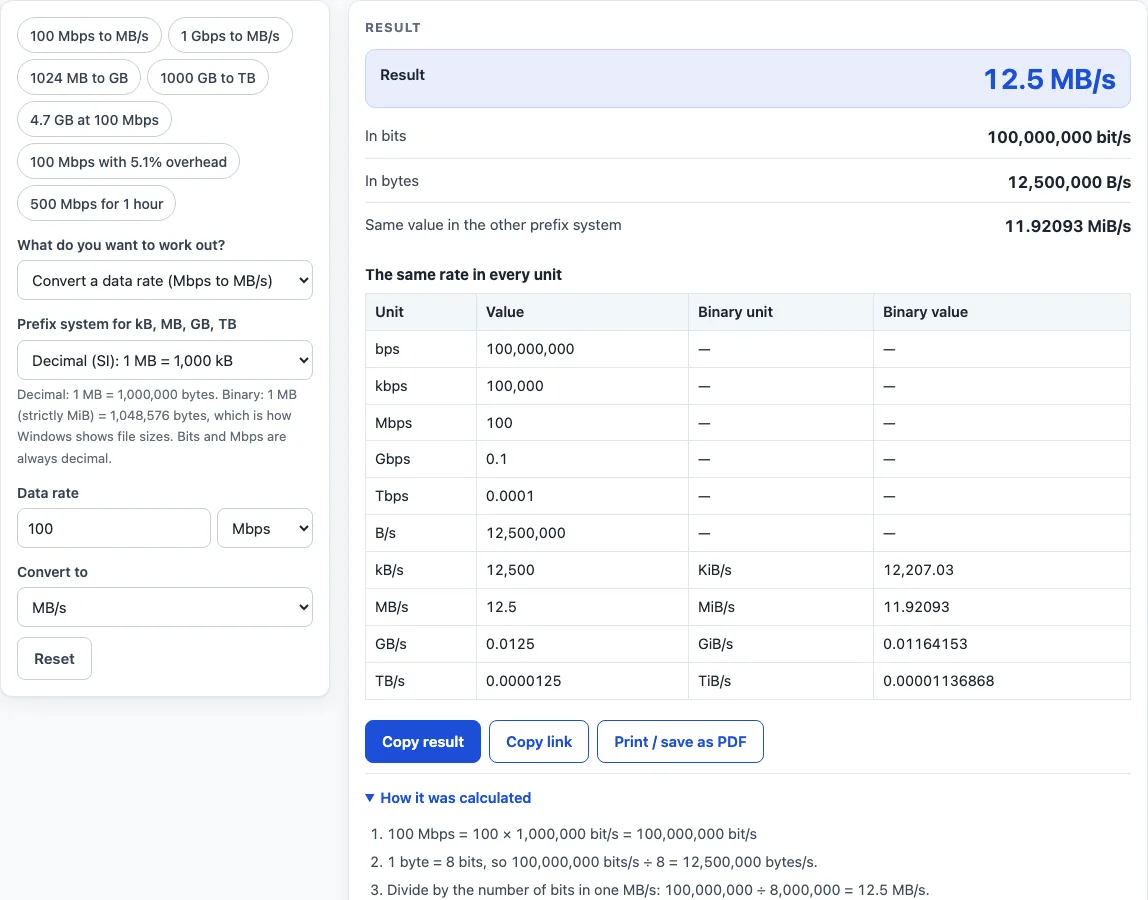
How to use the Mbps to MB/s converter
- Choose what you want to work out in the first select: Convert a data rate (Mbps to MB/s), Convert a data size (MB to GB), Transfer time for a file or Data moved in a given time.
- Set the prefix system in the second select: Decimal (SI) or Binary (IEC). Decimal is the system used for network speeds and for hard drive sizes.
- Type a number and pick its unit, for example 100 and Mbps. In transfer time mode enter the file size and the link speed; in the last mode enter the link speed and the time.
- In the two conversion modes choose the unit in Convert to, such as MB/s or GB.
- For the transfer modes set Overhead (%), the share of the link speed lost to protocol headers and other traffic. Use 0 for the ideal case.
- Read the result, then open “How it was calculated” to see each step. The table lists the same value in every unit, with byte units in decimal and binary side by side.
The preset chips load common cases: 100 Mbps to MB/s, 1 Gbps to MB/s, 1024 MB to GB, 1000 GB to TB, 4.7 GB at 100 Mbps, 100 Mbps with 5.1% overhead and 500 Mbps for 1 hour. Copy link stores your inputs in the address, and Print / save as PDF prints the inputs, results and steps.
How do you convert Mbps to MB/s?
Divide the number of megabits per second by 8 to get megabytes per second, because 1 byte is 8 bits. So 100 Mbps is 100,000,000 bits per second, which is 12,500,000 bytes per second, or 12.5 MB/s. Some other conversions in decimal units:
| Speed | In MB/s |
|---|---|
| 10 Mbps | 1.25 MB/s |
| 50 Mbps | 6.25 MB/s |
| 100 Mbps | 12.5 MB/s |
| 500 Mbps | 62.5 MB/s |
| 1 Gbps (1,000 Mbps) | 125 MB/s |
| 2.5 Gbps (2,500 Mbps) | 312.5 MB/s |
The letter case matters. Mbps has a small b for bits and MB/s has a capital B for bytes. Internet plans are sold in bits, while download windows show bytes, so a 100 Mbps plan peaks near 12.5 MB/s.
How do you convert MB to GB, and GB to TB?
In decimal units divide by 1,000: 2,500 MB is 2.5 GB and 500 GB is 0.5 TB. In binary units divide by 1,024: 1,024 MiB is 1 GiB and 1,024 GiB is 1 TiB. Pick the unit in the data size mode and the tool does the division, then lists the value in every unit.
Is 1 GB 1,000 MB or 1,024 MB?
Both are used, which is why the tool has a prefix setting. Decimal (SI) prefixes count in thousands: 1 kB is 1,000 bytes, 1 MB is 1,000,000 bytes and 1 GB is 1,000,000,000 bytes. Binary (IEC) prefixes count in 1,024s and have their own names: 1 KiB is 1,024 bytes, 1 MiB is 1,048,576 bytes and 1 GiB is 1,073,741,824 bytes. Hard drive makers use decimal. Windows shows binary values but labels them KB, MB and GB, so a drive sold as 500 GB shows as about 465 GB. Bit units such as kbps, Mbps and Mbit stay decimal in both settings.
How do you calculate file transfer time?
Divide the file size in bits by the effective speed in bits per second. The effective speed is the link speed minus the overhead you set. For 4.7 GB at 100 Mbps with 10% overhead: 4.7 GB is 37,600,000,000 bits and the effective speed is 90,000,000 bit/s, so the transfer takes 417.8 seconds, or 6 min 58 s. With no overhead it takes 376 seconds, or 6 min 16 s. The data transfer mode reverses the sum: 500 Mbps for 1 hour with 10% overhead moves 202.5 GB.
Real transfers are slower than the line rate because of protocol headers, retransmissions and other traffic. The default overhead of 10% is this tool’s own planning setting, not a standard. For TCP over IPv4 over Ethernet with 1,500-byte packets, one worked example puts efficiency at 94.9%, about 5.1% overhead, and a preset uses that value.
Worked examples
| Input | Result |
|---|---|
| 100 Mbps (decimal) | 12.5 MB/s |
| 1 Gbps (decimal) | 125 MB/s |
| 1024 MB (decimal) | 1.024 GB |
| 1024 MiB (binary) | 1 GiB |
| 4.7 GB at 100 Mbps, 10% overhead | 6 min 58 s |
| 500 Mbps for 1 h, 10% overhead | 202.5 GB |
Calculated by the tool above with these values.
Frequently asked questions
How many MB/s is 1 Gbps?
1 Gbps is 1,000 Mbps, which is 125 MB/s in decimal units, or about 119.2 MiB/s in binary units. A real transfer reaches less than that because of overhead.
What is the difference between MB and MiB?
An MB is 1,000,000 bytes and a MiB is 1,048,576 bytes, about 4.9% more. The binary unit MiB has a separate name so that the two are not mixed up, but many programs still print MB when they mean MiB.
Why is my real download speed lower than my Mbps plan?
Two things cause the gap. Your plan is in bits and your download window often shows bytes, so 100 Mbps appears as about 12.5 MB/s. On top of that, headers, retransmissions and other devices on the link use part of the speed. Set the overhead to see the effect.
How many megabits are in a megabyte?
One megabyte holds 8 megabits, because a byte is 8 bits. A 700 MB file is 5,600 Mbit.
Can I convert Gbps to Mbps or bits to bytes here?
Yes. Rate mode accepts bps, kbps, Mbps, Gbps and Tbps as well as B/s, kB/s, MB/s, GB/s and TB/s, and size mode accepts bits and bytes up to TB, so the same page also does bits to bytes and Gbps to Mbps.
Related tools
- Well-known ports: look up which service uses a TCP or UDP port number.
- RJ45 wiring diagram: see the pin and color order for an Ethernet cable.
- Subnet calculator: work out the network and host range for an address and mask.
- CIDR calculator: convert between CIDR prefixes and address counts.
- Subnet cheat sheet: compare common prefix lengths and block sizes.
- Private IP address ranges: check whether an address is private.