Private IP Address Ranges
The RFC 1918 and IPv6 private ranges at a glance, and a checker that tells you whether each address you paste is private.
Recent
Your last 10 settings, saved only in this browser. Nothing is uploaded.
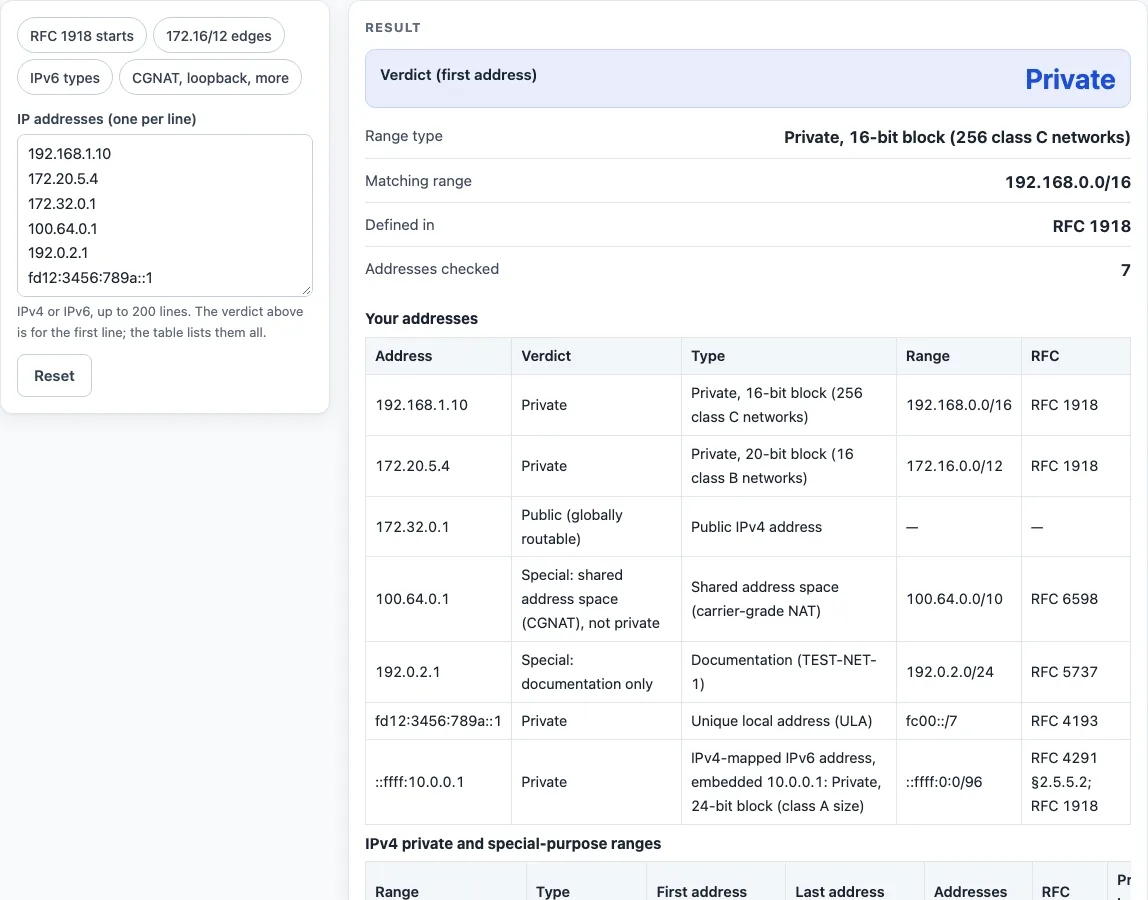
How to use the private IP address checker
- Choose a preset button above the form, such as RFC 1918 starts or IPv6 types, or type your own addresses into the input box.
- Enter one address per line. Commas or semicolons also separate addresses, and spaces are trimmed. Up to 200 lines are accepted. IPv6 addresses may use square brackets or a %zone suffix.
- Read the large result, which is the verdict for the first address. Below it, check the range type, the matching range (CIDR), the RFC and the number of addresses checked.
- Scan the table, which lists every address with its verdict, type, range and RFC. A line marked Not a valid IP address also triggers a warning, so correct it before you rely on the other rows.
- Open “How it was calculated” under the result to see the formula, the values substituted and the answer.
- Read any warnings. They appear for CGNAT, documentation, loopback, IPv4-mapped and global unicast IPv6 addresses.
Copy result copies the result lines with a link. Copy link copies the page address, which stores every input in the ?s= part of the URL. Print / save as PDF prints a one-page record of the inputs, results, steps and date. Reset restores the starting example.
What are the private IP address ranges?
| Range | First address | Last address | Addresses | Old class |
|---|---|---|---|---|
| 10.0.0.0/8 | 10.0.0.0 | 10.255.255.255 | 16,777,216 | Class A private range |
| 172.16.0.0/12 | 172.16.0.0 | 172.31.255.255 | 1,048,576 | Class B private ranges (16 × /16) |
| 192.168.0.0/16 | 192.168.0.0 | 192.168.255.255 | 65,536 | Class C private ranges (256 × /24) |
| fc00::/7 (IPv6 ULA) | fc00:: | fdff:ffff:ffff:ffff:ffff:ffff:ffff:ffff | 2^121 | — |
Anyone may use these private network addresses inside their own network without asking a registry; routers on the public internet do not carry them, so devices reach the internet through NAT. In IPv6, only fd00::/8 is used in practice for unique local addresses, with a random 40-bit global ID.
How does the checker decide?
The checker compares each address with a list of known ranges and reports the most specific range that contains it. The 172.16.0.0/12 block runs from 172.16.0.0 to 172.31.255.255, so 172.15.255.255 and 172.32.0.0 are both public. The 10.0.0.0/8 block holds 16,777,216 addresses and 192.168.0.0/16 holds 65,536.
Other non-routable IPv4 ranges are reported as special, not private. These include 100.64.0.0/10 for carrier-grade NAT (RFC 6598), 127.0.0.0/8 loopback, 169.254.0.0/16 link-local (RFC 3927), the documentation blocks 192.0.2.0/24, 198.51.100.0/24 and 203.0.113.0/24 (RFC 5737), 198.18.0.0/15 benchmarking, 224.0.0.0/4 multicast and 240.0.0.0/4 reserved. An IPv4 address in none of these ranges is reported as Public. Some software counts these special ranges as private too; this page keeps “private” to the RFC 1918 and RFC 4193 blocks.
IPv6 follows the same idea. Addresses inside 2000::/3 are global unicast and public. An IPv4-mapped address such as ::ffff:10.0.0.1 is judged by the IPv4 address inside it, so it is reported as Private.
Private addresses are also the reason two home networks can both use 192.168.1.0/24 without conflict: each router translates its LAN to its own public address. The flip side is that a VPN between two such networks needs different private ranges on each side, so pick an unusual block (for example 10.37.0.0/16) when you plan an office network.
Worked examples
| Input | Result |
|---|---|
| 1 address(es), first 192.168.1.10 | Private |
| 1 address(es), first 172.32.0.1 | Public (globally routable) |
| 1 address(es), first 100.64.0.1 | Special: shared address space (CGNAT), not private |
| 1 address(es), first fd12:3456:789a::1 | Private |
| 4 address(es), first 10.1.2.3 | Private |
Calculated by the tool above with these values.
Frequently asked questions
Is the calculator free, and is anything I type uploaded?
Yes, the calculator is free, and nothing you type is uploaded. The check runs in your browser, so the addresses stay on your device.
Results may be used in any work, including commercial reports, theses and client projects, without attribution. Check results against your network design and device documentation before you change a live configuration.
Can I print or share a calculation?
Yes. Print / save as PDF creates a one-page record that includes the inputs, results, calculation steps and date. Because the page link stores every input, anyone who opens it sees the same addresses and results.
Is 172.32.0.1 a private address?
No. The 172.16.0.0/12 block ends at 172.31.255.255, so 172.32.0.1 is reported as Public (globally routable).
Is 100.64.0.1 private?
No. It falls in 100.64.0.0/10, shared address space for carrier-grade NAT (RFC 6598), which this page reports as Special, not private.
Why does the checker say an IPv6 address is reserved or unassigned?
Only addresses inside 2000::/3 are global unicast. An IPv6 address outside that block, and outside the listed special ranges, is reported as reserved or unassigned.
Why is 010.0.0.1 marked as not a valid IP address?
Each IPv4 part must be a decimal number from 0 to 255 with no leading zeros, so 010.0.0.1 is rejected: some systems read a leading zero as octal, which would change the address.
Related tools
- Subnet cheat sheet: a quick reference for prefix lengths and block sizes when you plan a private network.
- Subnet calculator: works out network, broadcast and host ranges for an IPv4 block.
- Subnet mask calculator: converts between CIDR prefixes and dotted subnet masks.
- IPv6 subnet calculator: divides an IPv6 prefix into smaller subnets.
- IPv6 address format and examples: shows how IPv6 addresses are written, useful before you check one.