RJ45 Wiring Diagram
Pick T568A or T568B to see the wire color on each RJ45 pin, or enter the colors at both ends to check a cable.
Recent
Your last 10 settings, saved only in this browser. Nothing is uploaded.
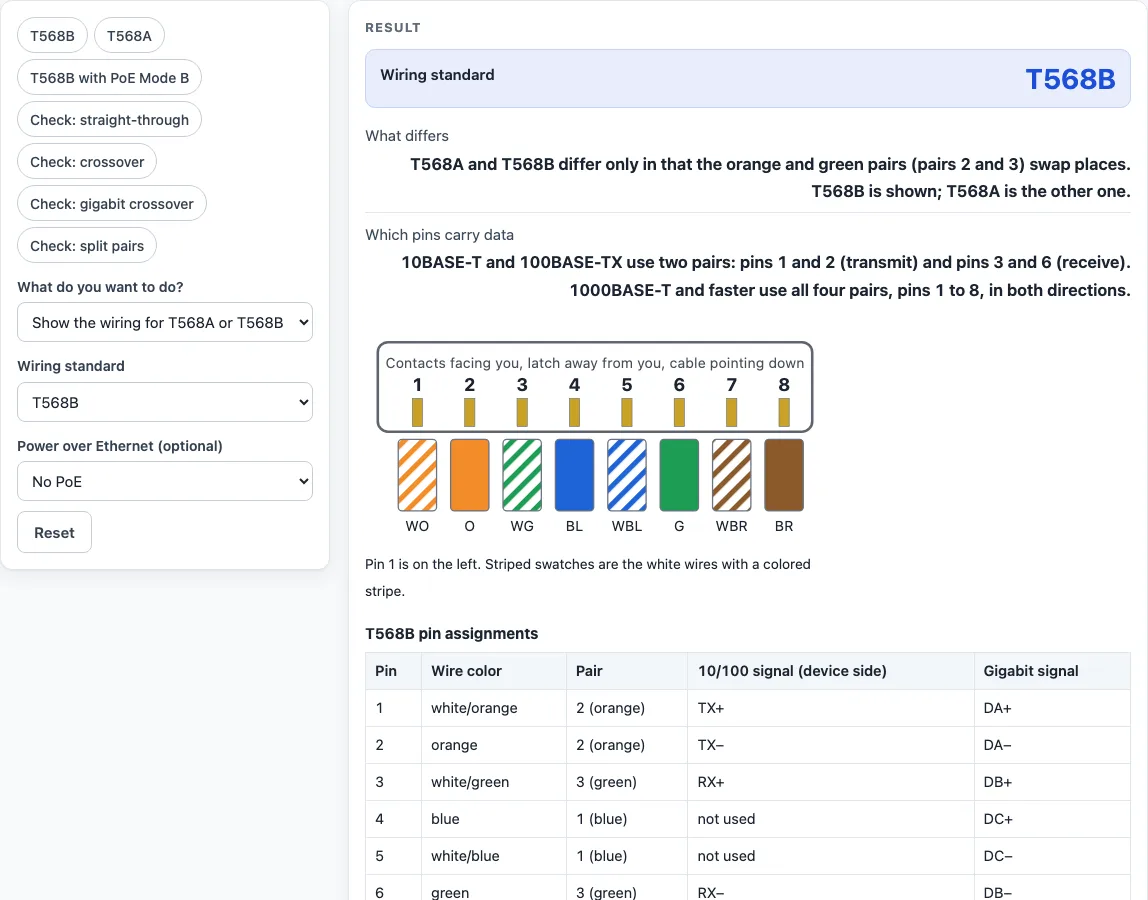
How to use the RJ45 wiring diagram
- Leave the first select on Show the wiring for T568A or T568B to see the plug diagram and the pin table.
- Choose a Wiring standard: T568B is the default, or pick T568A.
- Optionally choose a Power over Ethernet option: PoE Mode A, PoE Mode B or PoE 4-pair. A “Carries PoE power” column then appears in the table.
- Read the diagram and the table. Each row gives the pin, the wire color, the pair number, the 10/100 signal and the Gigabit signal.
- To check a cable, switch the first select to Check a cable (wire colors at both ends).
- Type the colors of pins 1 to 8 in Wire colors at end A, then in Wire colors at end B. Enter T568A or T568B, or eight colors separated by commas, such as wo, o, wg, bl, wbl, g, wbr, br. Hold each plug with the contacts facing you and the cable pointing down, then read the wires from the left: that is pin 1.
- Read the cable type, the pins that differ, the twisted-pair check and where to use the cable. The cable diagram draws one line for each wire.
The preset chips load examples in one click: T568B, T568A, T568B with PoE Mode B, and four cable checks (straight-through, crossover, gigabit crossover and split pairs). Copy link stores your inputs in the address so you can share the exact setup.
T568A vs T568B: what is the difference and which should I use?
T568A and T568B are the two wiring standards for the eight-wire RJ45 plug. They differ only in that the orange and green pairs swap places, which changes pins 1, 2, 3 and 6. The blue and brown pairs on pins 4, 5, 7 and 8 are the same in both. Either standard works, as long as both ends of a cable use the same one, so pick one and keep it throughout an installation.
| Pin | T568A | T568B |
|---|---|---|
| 1 | white/green | white/orange |
| 2 | green | orange |
| 3 | white/orange | white/green |
| 4 | blue | blue |
| 5 | white/blue | white/blue |
| 6 | orange | green |
| 7 | white/brown | white/brown |
| 8 | brown | brown |
What is the Ethernet cable color code?
The Ethernet cable color code names the four twisted pairs in the cable and the pins each pair uses. Every pair has one solid wire and one white wire with a stripe of the same color. Pair 1 is blue, pair 2 orange, pair 3 green and pair 4 brown. Blue always sits on pins 4 and 5 and brown on pins 7 and 8, while orange and green share pins 1, 2, 3 and 6 in the order the standard sets.
The two wires of a pair belong on a pin pair: 1 and 2, 3 and 6, 4 and 5, or 7 and 8. A pair split across other pins loses the twist that cancels interference, so crosstalk can cause errors. The checker reports split pairs for that reason.
What is the difference between a straight-through and a crossover cable?
A straight-through cable connects pin 1 to pin 1, pin 2 to pin 2 and so on. T568A at both ends, or T568B at both ends, makes one. It joins different kinds of device, such as a computer and a switch.
A 10/100 crossover cable has T568A on one end and T568B on the other. Pins 1 and 3 swap and pins 2 and 6 swap, while pins 4, 5, 7 and 8 stay straight. A gigabit crossover swaps all four pairs: pins 1 and 3, 2 and 6, 4 and 7, 5 and 8. Ports with Auto MDI-X work with either cable.
Worked examples
| Input | Result |
|---|---|
| T568B | 1 white/orange · 2 orange · 3 white/green · 4 blue · 5 white/blue · 6 green · 7 white/brown · 8 brown |
| T568A | 1 white/green · 2 green · 3 white/orange · 4 blue · 5 white/blue · 6 orange · 7 white/brown · 8 brown |
| End A: 1 WG · 2 G · 3 WO · 4 BL · 5 WBL · 6 O · 7 WBR · 8 BR | End B: 1 WO · 2 O · 3 WG · 4 BL · 5 WBL · 6 G · 7 WBR · 8 BR | Crossover cable (T568A at one end, T568B at the other) |
| End A: 1 WG · 2 G · 3 WO · 4 BL · 5 WBL · 6 O · 7 WBR · 8 BR | End B: 1 WG · 2 G · 3 WO · 4 BL · 5 WBL · 6 O · 7 WBR · 8 BR | Straight-through cable, T568A at both ends |
| End A: 1 WO · 2 O · 3 WG · 4 BL · 5 WBL · 6 G · 7 WBR · 8 BR | End B: 1 WO · 2 O · 3 BL · 4 WG · 5 WBL · 6 G · 7 WBR · 8 BR | Not a standard cable: the pins are connected in a pattern that is neither straight-through nor a crossover |
Calculated by the tool above with these values.
Frequently asked questions
Can I mix T568A at one end and T568B at the other?
Yes, but the result is a crossover cable for 10/100 Ethernet, not a straight-through cable. If you want a normal patch cable, use the same standard at both ends. The checker names the cable type either way.
Do I still need a crossover cable?
Usually not. Ports with Auto MDI-X, which most current equipment has, work with a straight-through or a crossover cable. You need a crossover only to join two devices of the same kind when neither port has Auto MDI-X. For Gigabit Ethernet the fully crossed version is the only crossover cable, and it also works at 10 and 100 Mbps.
Which pins does Gigabit Ethernet use compared with 10/100?
10BASE-T and 100BASE-TX use two pairs: pins 1 and 2 transmit and pins 3 and 6 receive, and pins 4, 5, 7 and 8 carry no data. Gigabit Ethernet (1000BASE-T) and faster use all four pairs, pins 1 to 8, in both directions. A cable with only pins 1, 2, 3 and 6 connected can reach 10 or 100 Mbps but not Gigabit.
Is RJ45 the same as 8P8C?
The plug used for Ethernet is an 8P8C connector: eight positions and eight contacts. People usually call it RJ45, a name taken from the telephone industry’s registered jack, although 8P8C is the more accurate term. The tool uses RJ45 because that is what most people search for.
Why does the checker report a split pair?
It reports a split pair when the two wires of one twisted pair are not on pins 1 and 2, 3 and 6, 4 and 5 or 7 and 8. Such a cable can pass a continuity test yet suffer crosstalk and errors. Re-terminate it with T568A or T568B order.
Is the tool free and is anything uploaded?
Yes, it is free and has no sign-up. It runs in your browser and nothing you enter is uploaded.
Related tools
- Well-known ports: look up which service uses a port number when you configure a network device.
- Mbps to MB/s: convert a link speed such as 1000 Mbps into megabytes per second and estimate transfer times.
- MAC address lookup: find the manufacturer behind a device’s MAC address.
- Subnet cheat sheet: compare common subnet sizes and masks at a glance.
- Private IP address ranges: check whether an address is reserved for private networks.
- IP to binary converter: see an IP address in binary when you work through subnet math.
- Subnet calculator: work out network and host ranges for an address and mask.