Subnet Cheat Sheet (Subnet Mask Chart)
Every prefix from /0 to /32 with its subnet mask, wildcard, addresses and usable hosts; highlight a row or print the chart.
Recent
Your last 10 settings, saved only in this browser. Nothing is uploaded.
How to use the subnet cheat sheet
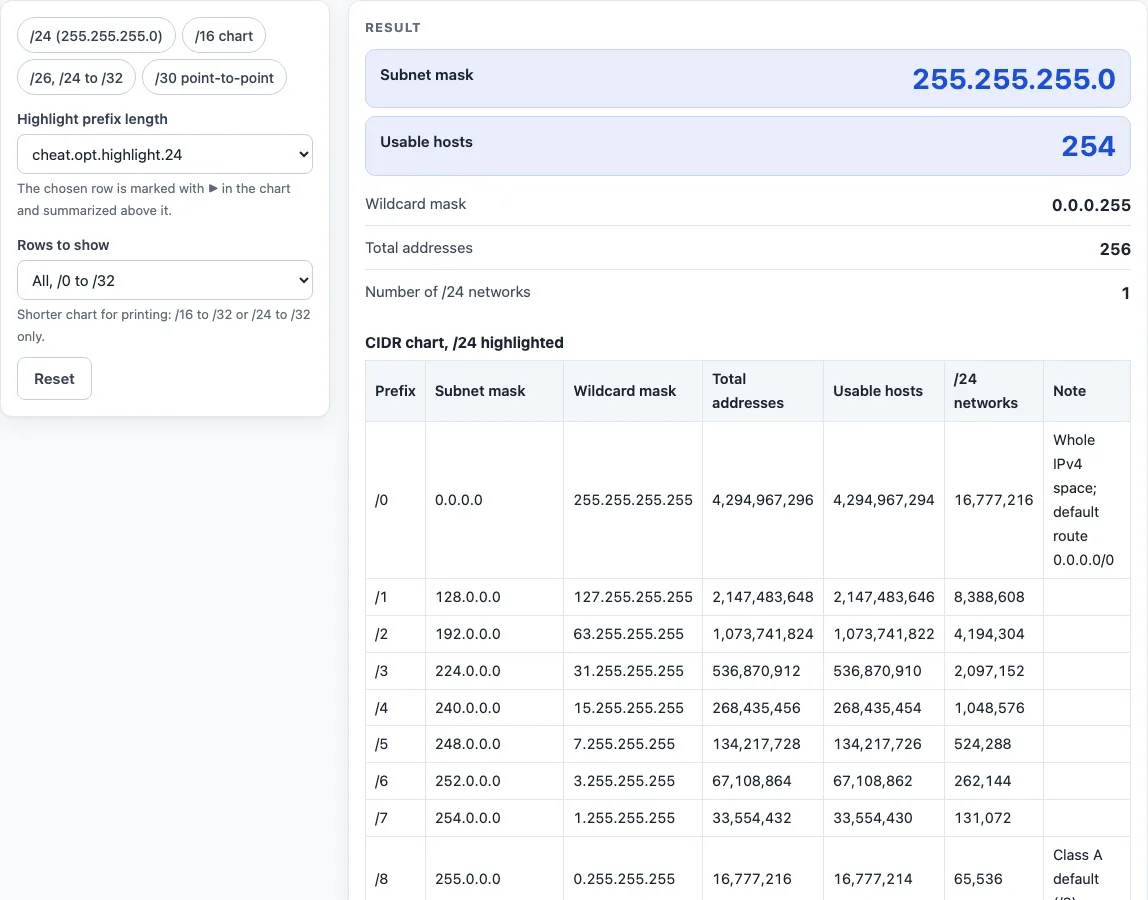
- Look at the chart at the top of the page. Each row is one prefix from /0 to /32, with seven columns: prefix, subnet mask, wildcard mask, total addresses, usable hosts, number of /24 networks and a note.
- Set Highlight prefix length (default /24). That row is marked with ▶ in the chart.
- Read the result for that prefix: the subnet mask, the two large usable host figures, the wildcard mask, total addresses and number of /24 networks.
- Open How it was calculated under the result to see the formula, the values substituted and the answer.
- Choose Rows to show: all /0 to /32 (33 rows), /16 to /32 only (17 rows) or /24 to /32 only (9 rows).
- Check the note column and any warning. Warnings appear for /0, /31 and /32, and when the highlighted prefix is outside the chosen row range.
Preset buttons above the form load typical cases: /24 (255.255.255.0), a /16 chart, /26 with /24 to /32 rows, and /30 point-to-point with /24 to /32 rows. Reset restores the starting example. To print the chart, use Print / save as PDF. Choosing the /24 to /32 rows gives a one-page cheat sheet.
Example: highlight /26 and the summary gives the mask 255.255.255.192, 62 usable hosts, the wildcard 0.0.0.63 and 1/4 of a /24.
Copy link keeps the highlighted prefix and row filter, so a shared link opens the same view.
How to read a subnet mask cheat sheet
Every row follows from one rule: a prefix of /p gives p network bits and leaves 32 − p bits for hosts. The subnet mask is p one-bits followed by 32 − p zero-bits, so /24 is 255.255.255.0. The wildcard mask is 255.255.255.255 minus the mask, which is why /26 gives 0.0.0.63 and router access lists use it. Total addresses equal 2^(32 − p). Usable hosts subtract two for the network and broadcast addresses on /0 to /30. The /24 networks column counts how many /24 blocks fit, so /16 gives 256, and for longer prefixes it shows a fraction, so /26 gives 1/4.
Which prefixes are worth memorising?
Most subnetting work happens in the last octet, so the subnetting cheat sheet rows from /24 to /30 are the ones to know by heart. The pattern repeats: each step of one bit halves the block, so the last-octet masks run 0, 128, 192, 224, 240, 248, 252 and the block sizes 256, 128, 64, 32, 16, 8, 4. A /27 (mask 255.255.255.224) has blocks of 32 and 30 usable hosts; a /29 (255.255.255.248) has blocks of 8 and 6 usable hosts; a /30 (255.255.255.252) has 2 usable hosts and is the classic router link.
The same pattern appears one octet to the left for /16 to /23: /22 is 255.255.252.0 with 1,024 addresses, /23 is 255.255.254.0 with 512. If you remember the eight last-octet values and the block sizes, any mask in the subnet chart can be worked out from them.
The chart is also the quickest way to answer exam-style questions such as “how many hosts in a /21?” (2,046) or “which mask gives at least 500 hosts?” (/23, 255.255.254.0, 510 hosts) without a calculator.
For IPv6 prefixes, use the separate IPv6 subnet cheat sheet, which counts /64 networks instead of hosts.
Why does the usable host count subtract two?
In every IPv4 subnet from /0 to /30, the first address names the network and the last is the broadcast address that reaches every host on it (RFC 950), so neither can be given to a device. That is why a /24 has 256 addresses but 254 usable hosts. The two exceptions at the bottom of the chart are /31, where RFC 3021 lets both addresses be used on a point-to-point link, and /32, a single host address.
Worked examples
| Input | Result |
|---|---|
| Highlight /24 | Mask 255.255.255.0, 254 usable hosts |
| Highlight /26 | Mask 255.255.255.192, 62 usable hosts |
| Highlight /30 | Mask 255.255.255.252, 2 usable hosts |
| Highlight /16 | Mask 255.255.0.0, 65,534 usable hosts |
| Highlight /8 | Mask 255.0.0.0, 16,777,214 usable hosts |
Calculated by the tool above with these values.
Frequently asked questions
Is the calculator free, and is anything I type uploaded?
The calculator is free, and there is no account or sign-up. Nothing you type is uploaded, because every calculation runs in your browser and nothing is sent to a server.
Since the calculation stays on your device, you can use the results in any work, including commercial reports, theses and client projects, without attribution. Still, check the values against your network design and device documentation before you change a live configuration.
Can I print or share a calculation?
Yes. Print / save as PDF produces a one-page record with the inputs, the results, the calculation steps and the date. Copy result copies the result lines with a link.
Copy link copies the page address, which stores every input in the ?s= part of the URL. The same chart reopens later with those settings, or you can send the link to a colleague.
What does the ▶ mark show in the chart?
It marks the row for the prefix you chose in Highlight prefix length. The default is /24, so that row is marked when the page first loads.
Why does /31 show 2 usable hosts when other prefixes subtract two?
RFC 3021 allows a /31 on point-to-point links, where both addresses can be used, so the chart shows 2. Not every older device supports this, which is why the calculator shows a warning for /31.
What does the /0 row mean?
/0 matches every address and is written 0.0.0.0/0, which is used as a default route. The row shows 4,294,967,296 total addresses and 4,294,967,294 usable hosts, and it carries a warning.
Why does the /24 networks column show fractions?
A prefix longer than /24 is smaller than one /24 block, so the column shows its share of one. /26 is 1/4 and /30 is 1/64. For /24 and shorter prefixes, the column shows a whole number, such as 256 for /16.
What do the Class A, B and C notes mean?
They mark the classful defaults /8, /16 and /24 from RFC 791. These are historical boundaries, and a network can use any prefix length, so the note does not set the size of your network.
How were the numbers checked?
All 33 rows are generated by the same code the chart runs and tested against an independent reference implementation. CIDR notation follows RFC 4632, and subnet masks follow RFC 950.
Related tools
- Subnet calculator - use it to work out the network address, host range and broadcast address for one specific IP address and prefix.
- Subnet mask calculator - use it to convert between a prefix length and a dotted subnet mask.
- CIDR calculator - use it to see the address range and size of any CIDR block.
- IP range to CIDR converter - use it when you have a start and end address and need the matching CIDR blocks.
- Wildcard mask calculator - use it to get the wildcard mask for an access list.
- IP to binary converter - use it to see how an address or mask looks in binary bits.
- Private IP address ranges - use it to check which blocks are reserved for private networks.
- Subnetting practice - use it to test yourself with subnetting questions.
- /29 subnet mask - use it for details on the /29 prefix, its mask and its host count.