Subnet Mask Calculator
Find the subnet mask for the hosts or subnets you need, or convert between prefix, dotted mask, wildcard and binary.
Recent
Your last 10 settings, saved only in this browser. Nothing is uploaded.
How to use the Subnet Mask Calculator
- Open the Solve for menu and choose a mode: mask for a number of hosts, mask for a number of subnets, or convert a mask between forms.
- In hosts mode, type the hosts needed per subnet (1 to 4,294,967,294). If you want to see how many subnets of that size fit in a larger block, change the network from the default 10.0.0.0/16.
- In subnets mode, type a network such as 10.0.0.0/16 and the number of subnets you need.
- In convert mode, type a prefix (/26 or 26), a dotted mask (255.255.255.192), a wildcard mask (0.0.0.63), a hex mask (0xFFFFFFC0) or a binary mask.
- Read the two main answers, the subnet mask and the prefix length. Then check usable hosts per subnet, the number of subnets and the unused subnets.
- Open How it was calculated under the result to see the formula, the values it used and the answer.
- Use a preset button above the form to load a typical case, or select Reset to return to the starting example.
Copy result copies the result lines with a link. Copy link copies the page address, which stores every input, so the same calculation reopens later or can be sent to a colleague. Print / save as PDF prints a one-page record with your inputs, results, calculation steps and the date.
What is a subnet mask (netmask)?
A subnet mask is a 32-bit number that tells a device which part of an IPv4 address identifies the network and which part identifies a host on that network. It is written in dotted form, such as 255.255.255.0, or as a prefix length, such as /24. In binary, the network part is all 1-bits and the host part is all 0-bits. CIDR masks must be one unbroken run of 1-bits, as set out in RFC 950 and RFC 4632.
What is an IP subnet mask, and what is a subnet mask in an IP address?
Every IPv4 address on a network is used together with a mask. A device combines the two with a bitwise AND, which keeps the address bits where the mask has 1s and clears the rest. For 10.0.0.5 with the mask 255.255.255.0, the result is 10.0.0.0, the network address. Devices that produce the same network address can reach each other directly. Devices that produce different ones need a router between them.
How can I find or get the subnet mask for (or from) an IP address?
An IP address alone does not reveal its mask, because the same address can sit in networks of different sizes. The mask is set by the network design and is stored in the device’s network settings, where it appears next to the IP address. When you plan a new network, you choose the mask from the hosts or subnets you need. That is the job of the calculator’s hosts mode and subnets mode.
How to calculate a subnet mask (network mask) from an IP address and host count
To find the mask for a given number of hosts, use powers of two:
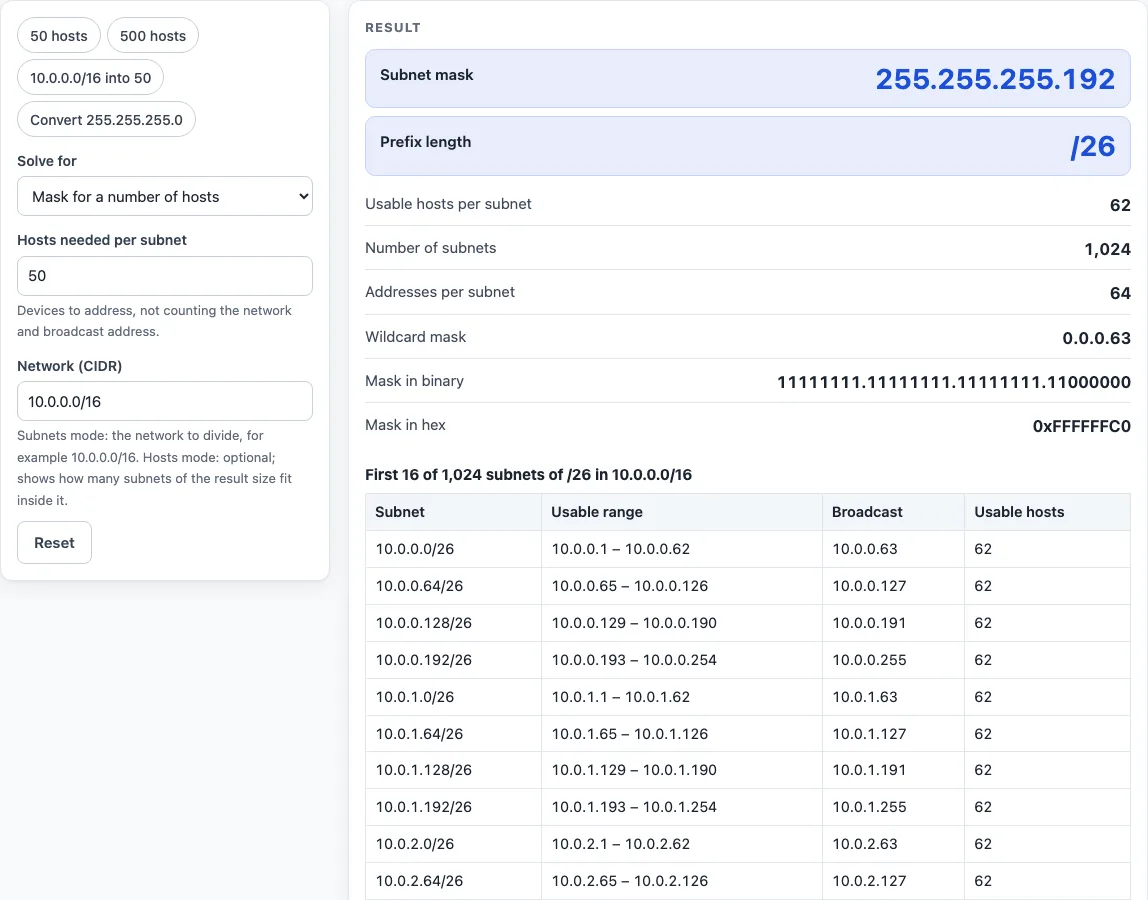
- Add 2 to the number of hosts, for the network and broadcast addresses. For 50 hosts, 50 + 2 = 52.
- Find the smallest power of two that holds that many addresses. 2^6 = 64 is the first that works.
- The exponent is the number of host bits. Here it is 6.
- Subtract the host bits from 32 to get the prefix: 32 − 6 = /26. The mask is 255.255.255.192.
The usable hosts per subnet are 2^(32 − prefix) − 2, which is 64 − 2 = 62 here. The exception is /31, which has 2 usable addresses on a point-to-point link (RFC 3021), and /32, which has 1.
How to determine subnet mask when splitting a network?
Splitting a network borrows bits from the host part. Choose the smallest number of borrowed bits b so that 2^b is at least the number of subnets you want, then add b to the old prefix. For 10.0.0.0/16 divided into 50 subnets, 2^6 = 64 is at least 50, so b = 6. The new prefix is 16 + 6 = /22, with mask 255.255.252.0. Each subnet has 2^10 − 2 = 1,022 usable hosts. The split creates 64 subnets, so 14 are unused. The first two are 10.0.0.0/22 and 10.0.4.0/22.
Worked examples
| Input | Result |
|---|---|
| 50 hosts per subnet | 255.255.255.192 (/26), 62 usable hosts per subnet |
| 500 hosts per subnet | 255.255.254.0 (/23), 510 usable hosts per subnet |
| 50 subnets from 10.0.0.0/16 | 255.255.252.0 (/22), 1,022 usable hosts per subnet |
| 4 subnets from 192.168.1.0/24 | 255.255.255.192 (/26), 62 usable hosts per subnet |
| convert 255.255.254.0 | 255.255.254.0 (/23), 510 usable hosts per subnet |
Calculated by the tool above with these values.
Frequently asked questions
Is the subnet mask calculator free, and is anything I type uploaded?
Yes, it is free, and there is no account or sign-up. Everything is calculated in your browser, and nothing you type is uploaded.
Can I print or share a calculation?
Yes. Print / save as PDF creates a one-page record with your inputs, results, calculation steps and the date. Copy link copies a page address that stores your inputs, so the same calculation opens later or can be sent to a colleague.
Why does hosts mode return /30 for 1 or 2 hosts?
It returns /30 because that is the traditional smallest ordinary subnet. The calculator shows a warning that RFC 3021 allows /31 on a point-to-point link, and /32 for a single address.
Why is my subnet mask rejected with an error?
The 1-bits of a mask must form one unbroken run. A mask such as 255.0.255.0 breaks that rule, so the calculator shows an error with its binary form so you can see the problem.
What happens if my network address has host bits set?
If you type 10.0.0.5/16, the calculator uses the network address 10.0.0.0/16 and shows a warning.
Can I use the results in my work?
Yes. Results may be used in any work, including commercial reports, theses and client projects, without attribution.
Should I trust the results before changing a live network?
Results are calculated in your browser from the values you enter. Check them against your network design and device documentation before you change a live configuration.
Related tools
- Subnet calculator - use it for a general overview of a network, its range and its hosts.
- CIDR calculator - use it when you work mainly with prefix notation such as /26.
- IP range to CIDR converter - use it when you have a start and end address and need matching CIDR blocks.
- Subnet cheat sheet - use it for a quick reference of common masks and their host counts.
- Wildcard mask calculator - use it when a router or access list needs the inverse of a subnet mask.
- IP to binary converter - use it to see how an address or mask looks bit by bit.
- VLSM calculator - use it when subnets need different sizes within one network.
- Visual subnet calculator - use it to see how a network is divided into blocks.
- Subnetting practice - use it to test your skills on subnet problems.