Subnetting Practice Questions
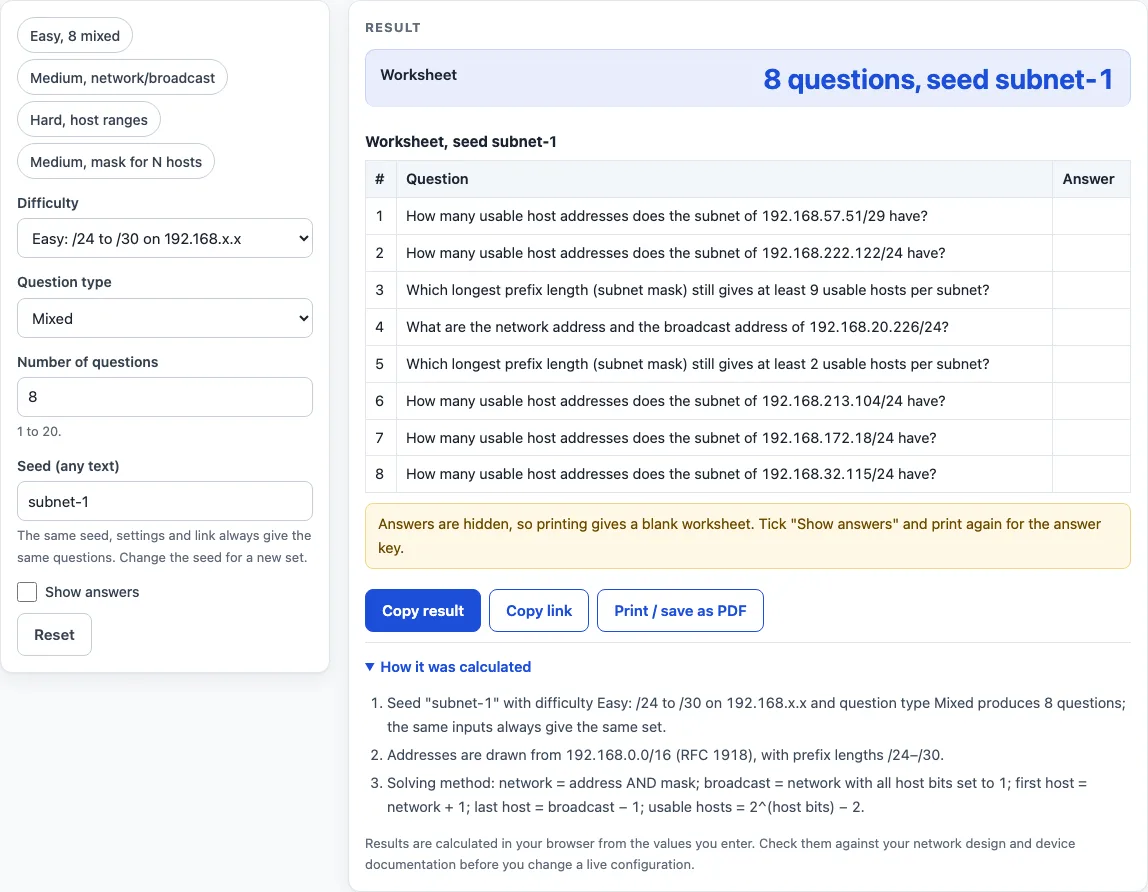
Choose a difficulty and question type to get a subnetting worksheet; tick Show answers for the key.
Recent
Your last 10 settings, saved only in this browser. Nothing is uploaded.
Subnetting practice is a free worksheet generator that creates IPv4 subnetting questions with an optional answer key. This subnetting practice calculator builds a sheet of 1 to 20 questions at easy, medium or hard difficulty, and you choose the question type, such as network and broadcast addresses, usable host ranges, usable host counts, or the mask for N hosts. It runs in your browser with no sign-up.
Each sheet is built from a seed, so the same settings always produce the same questions. That makes the worksheets useful for homework, classroom drills, exam revision, or checking your own working. Answers stay hidden until you switch on Show answers, so you can attempt every question first. Use it to practise subnetting before a networking exam, or as subnet mask practice for a class.
How to use the subnetting practice calculator
- Enter the number of questions. Use a whole number from 1 to 20.
- Choose a difficulty: Easy, Medium or Hard.
- Choose a question type: network and broadcast address, first and last usable host, number of usable hosts, mask for N hosts, or mixed.
- Type a seed. Any text works, but the seed cannot be empty.
- Read the result line, which reads “N questions, seed X”, then check the table. It has three columns: number, question and answer.
- Tick Show answers to fill the answer column. The box is off by default, so the answers stay hidden.
- Click Print / save as PDF to print the worksheet. If Show answers is on, the printout includes the answer key.
You can also click a preset above the form to load a ready-made set, such as Easy with 8 mixed questions and seed subnet-1, or Hard host ranges with seed exam and 6 questions.
Work each question on paper first, then tick Show answers to check: the key gives the network, broadcast, host range, host count or mask exactly as the question asks.
Change the seed to get a fresh set; keep it to give the same sheet to a whole class.
How do you solve a subnetting practice question?
Every answer in the key follows the same rules, where p is the prefix length:
- Network address = address AND subnet mask.
- Broadcast address = network address with all host bits set to 1.
- First usable host = network + 1; last usable host = broadcast − 1.
- Usable hosts = 2^(32 − p) − 2.
For example, 172.24.145.70/29 has 3 host bits, so blocks are 8 addresses wide. 70 rounded down to a multiple of 8 is 64, so the network is 172.24.145.64, the broadcast is 172.24.145.71, and the usable hosts run from 172.24.145.65 to 172.24.145.70: 2^3 − 2 = 6 hosts. The fastest mental method is exactly this: find the block size in the octet where the mask changes, then round down.
How do you find the mask for N hosts?
Add 2 for the network and broadcast addresses, round up to a power of two, and subtract the number of host bits from 32. The answer is the longest prefix, up to /30, that still gives at least N usable hosts — the smallest subnet that fits wastes the fewest addresses. Questions never use /31 or /32, so the point-to-point and single-host exceptions do not appear on the worksheet.
Which addresses do the questions use?
Easy questions use 192.168.x.x addresses with prefixes from /24 to /30. Medium questions draw from all three private ranges (RFC 1918) with prefixes from /16 to /30, and hard questions add the documentation blocks 192.0.2.0/24, 198.51.100.0/24 and 203.0.113.0/24 (RFC 5737) with prefixes from /8 to /30, so no question points at a real company’s network. A prefix is never shorter than the block it comes from.
Worked examples
| Input | Result |
|---|---|
| Easy: /24 to /30 on 192.168.x.x, Mixed, seed subnet-1 | 8 questions, seed subnet-1 |
| Easy: /24 to /30 on 192.168.x.x, Mixed, seed subnet-1 | 8 questions, seed subnet-1 |
| Medium: /16 to /30, private addresses, Network and broadcast address, seed class-1 | 10 questions, seed class-1 |
| Hard: /8 to /30, private and documentation space, First and last usable host, seed exam | 6 questions, seed exam |
| Medium: /16 to /30, private addresses, Mask for N hosts, seed masks | 5 questions, seed masks |
Calculated by the tool above with these values.
Frequently asked questions
Is the calculator free, and is anything I type uploaded?
Yes, the calculator is free, and nothing you type is uploaded. The worksheet is generated in your browser, nothing is sent to a server, and there is no account or sign-up.
Results may be used in any work, including classroom handouts and training material, without attribution.
Can I print or share a calculation?
Yes. Print / save as PDF produces a worksheet with a blank answer column, or turn on Show answers first to print the answer key. To share a sheet, send the difficulty, question type, count and seed. Those four settings always rebuild the same questions.
How does the seed make the same questions every time?
The generator hashes the difficulty, question type and seed with 32-bit FNV-1a, then feeds the result into a mulberry32 pseudo-random generator. Identical inputs always produce identical questions. A shorter set with the same seed is the first part of a longer one, so the first five questions of a 10-question sheet match a 5-question sheet.
Why does Hard difficulty only use /24 to /30 for documentation blocks?
The RFC 5737 blocks 192.0.2.0/24, 198.51.100.0/24 and 203.0.113.0/24 are reserved for documentation, so the tool gives them only prefixes from /24 to /30. On Hard, a prefix is never shorter than its block, so an RFC 1918 block such as 172.16.0.0/12 is never shown with a prefix below /12.
Are /31 and /32 ever on the worksheet?
No. Questions never use /31 or /32, so you will not see the special rule for point-to-point links or the single-host rule. Every answer uses the classic network and broadcast addresses, which makes the sheet consistent for learning.
Should I use these answers on a live network?
No. Use the worksheets for practice. The results are calculated in your browser from the values you enter, so check them against your network design and device documentation before you change a live configuration.
Related tools
- VLSM calculator: Use it when you need to split a network into subnets of different sizes.
- Visual subnet calculator: Use it when you want to see how a block is divided into subnets.
- Subnet calculator: Use it to check the network, broadcast and host range for any address and prefix.
- Subnet mask calculator: Use it to convert between prefix lengths and dotted subnet masks.
- CIDR calculator: Use it to work with CIDR notation and address block sizes.
- Subnet cheat sheet: Use it as a quick reference for common prefixes and host counts while you practise.
- Private IP address ranges: Use it to look up the RFC 1918 blocks used on the medium and hard worksheets.
- /29 subnet mask: Use it to see the details of a /29 network, which gives 6 usable hosts.
- /27 subnet: Use it to see the details of a /27 network, which gives 30 usable hosts.