TCP vs UDP
Compare TCP and UDP, find which one an application or port uses, and see the header overhead of each.
Recent
Your last 10 settings, saved only in this browser. Nothing is uploaded.
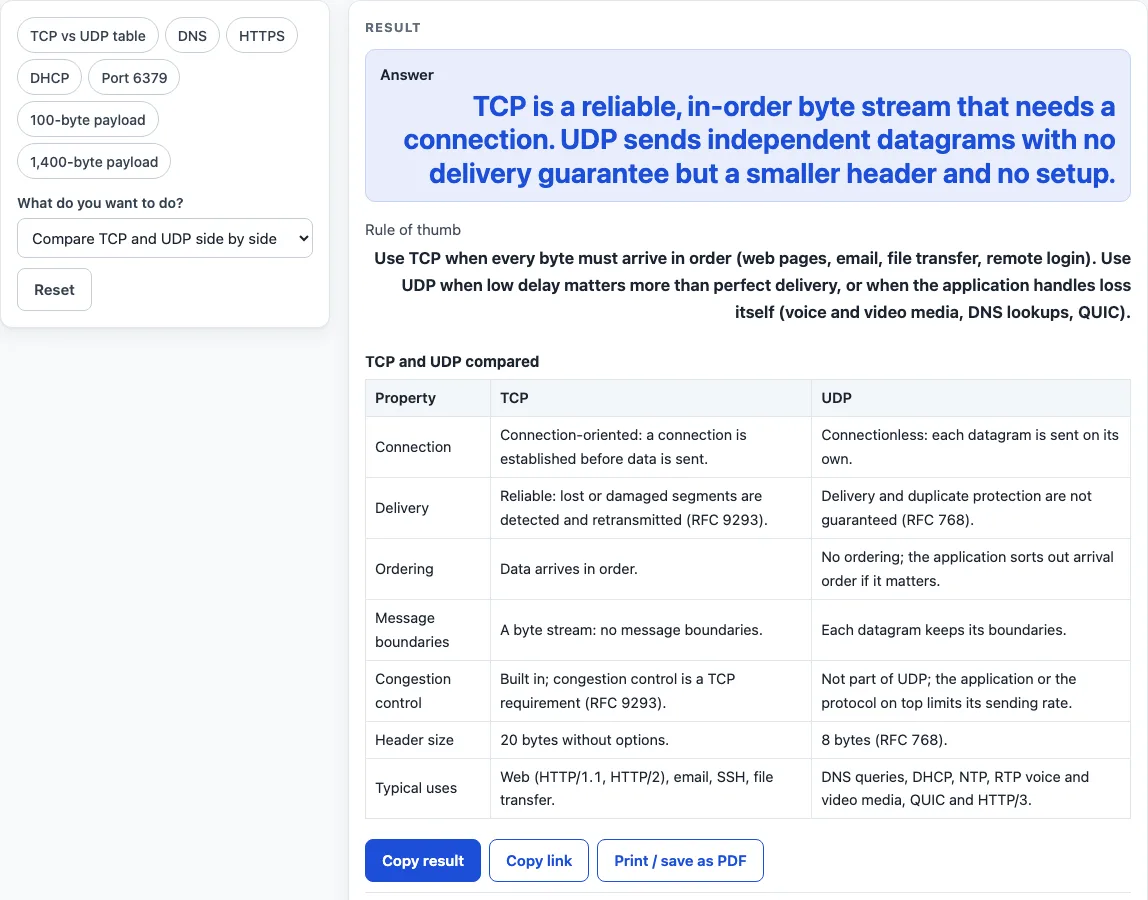
How to use the TCP vs UDP tool
- Open the first dropdown and choose a mode: Compare TCP and UDP side by side, Which protocol does my application use?, Is a port TCP, UDP or both? or Compare header overhead per packet.
- For the side-by-side mode, read the table. Each row covers connection, delivery, ordering, message boundaries, congestion control, header size and typical uses.
- For the application mode, open the application picker and select an option such as HTTP, DNS, SSH or HTTP/3. The result shows the protocol, the port, the reason and the RFC source.
- For the port mode, type a port number into the port field. You can include the word “port” before the number, because it is ignored. The result states whether the IANA registry lists the port for TCP only, UDP only or both.
- For the overhead mode, type the payload size in bytes (a whole number from 1 to 65,000). Select IPv4 (20-byte IP header) or IPv6 (40-byte IP header). The result shows the packet size and the share of the packet taken by headers for both UDP and TCP.
- To test quickly, click a preset chip: TCP vs UDP table, DNS, HTTPS, DHCP, Port 6379, 100-byte payload or 1,400-byte payload.
Use Copy link to save your inputs in the address bar, so you can return to the same result. Use Print / save as PDF to print the current result or save it as a PDF.
What is the difference between TCP and UDP?
TCP is connection-oriented: a connection is set up before any data is sent, and TCP detects lost or damaged segments and retransmits them. Data arrives in order and as a continuous byte stream, so the receiver does not see your original message boundaries. UDP is connectionless: each datagram is sent on its own, with no setup, no retransmission and no ordering. Datagrams keep their boundaries, but nothing guarantees they arrive or arrive once.
The protocols also differ in overhead. A UDP header is 8 bytes. A TCP header is 20 bytes without options, which is 12 bytes more. TCP also keeps state for acknowledgments and retransmission, and congestion control is built into TCP as a requirement under RFC 9293. UDP does not include congestion control, so an application that uses UDP must handle that itself.
Which should I use, TCP or UDP?
Use TCP when every byte must arrive in order, such as web pages, email, file transfer and remote login. Use UDP when low delay matters more than perfect delivery, or when the application can handle loss on its own. Voice and video media, DNS lookups and QUIC are common examples of UDP use.
The choice comes down to what happens when a packet is lost. If a missing piece would corrupt the result, TCP’s retransmission is worth its cost. If a late piece is worse than a missing one, as with a live voice call, UDP’s lack of waiting suits the job better. Many applications combine both, with a UDP-based protocol handling its own reliability where needed.
Worked examples
| Input | Result |
|---|---|
| TCP and UDP side by side | TCP is a reliable, in-order byte stream that needs a connection. UDP sends independent datagrams with no delivery guarantee but a smaller header and no setup. |
| HTTPS | HTTPS: uses TCP |
| DHCP | DHCP: uses UDP |
| Port 6379 | Port 6379 (redis): registered for TCP only |
| 100-byte payload, IPv4 | 128 bytes on the wire, 28 bytes of headers (21.88% of the packet) / 140 bytes on the wire, 40 bytes of headers (28.57% of the packet) |
Calculated by the tool above with these values.
Frequently asked questions
Does DNS use TCP or UDP?
DNS uses UDP port 53 for ordinary queries. It switches to TCP port 53 for answers too large to fit in one UDP message and for zone transfers, as described in RFC 1035.
Is HTTP/3 TCP or UDP?
HTTP/3 runs over QUIC, and QUIC is built on UDP. Servers may use any UDP port and advertise it, and the IANA registry lists UDP for port 443.
Why is UDP faster than TCP?
UDP is not inherently faster. Because it skips connection setup and does not wait for retransmissions, it can avoid some delays, which is why it suits real-time traffic. This tool does not measure speed or latency, so it shows header sizes and protocol rules, not performance.
Can a port use both TCP and UDP?
Yes. The port lookup can report that a port is registered for both, as with port 53. A registration for both protocols does not mean the service uses both, so check the application’s protocol for the actual behavior.
Does UDP guarantee delivery?
No. UDP does not guarantee delivery, duplicate protection or ordering. Any reliability has to come from the application.
Is the tool free and is anything uploaded?
Everything runs in your browser, and nothing is uploaded. The inputs are only protocol names, port numbers and byte counts. The tool is free and needs no sign-up.
Related tools
- Well-known ports: look up the standard service assigned to a port number when you need more than the TCP or UDP status.
- Private IP address ranges: check which IPv4 addresses are reserved for private networks.
- Subnet calculator: work out network and host ranges for an IP address and mask.
- CIDR calculator: convert between CIDR prefix lengths and subnet masks.
- Mbps to MB/s: convert link speeds and estimate transfer times.
- RJ45 wiring diagram: see the pin and color order for an Ethernet cable.