Visual Subnet Calculator
Enter a network and click Divide or Join to lay out its subnets; each row shows the range, mask, hosts and share.
Recent
Your last 10 settings, saved only in this browser. Nothing is uploaded.
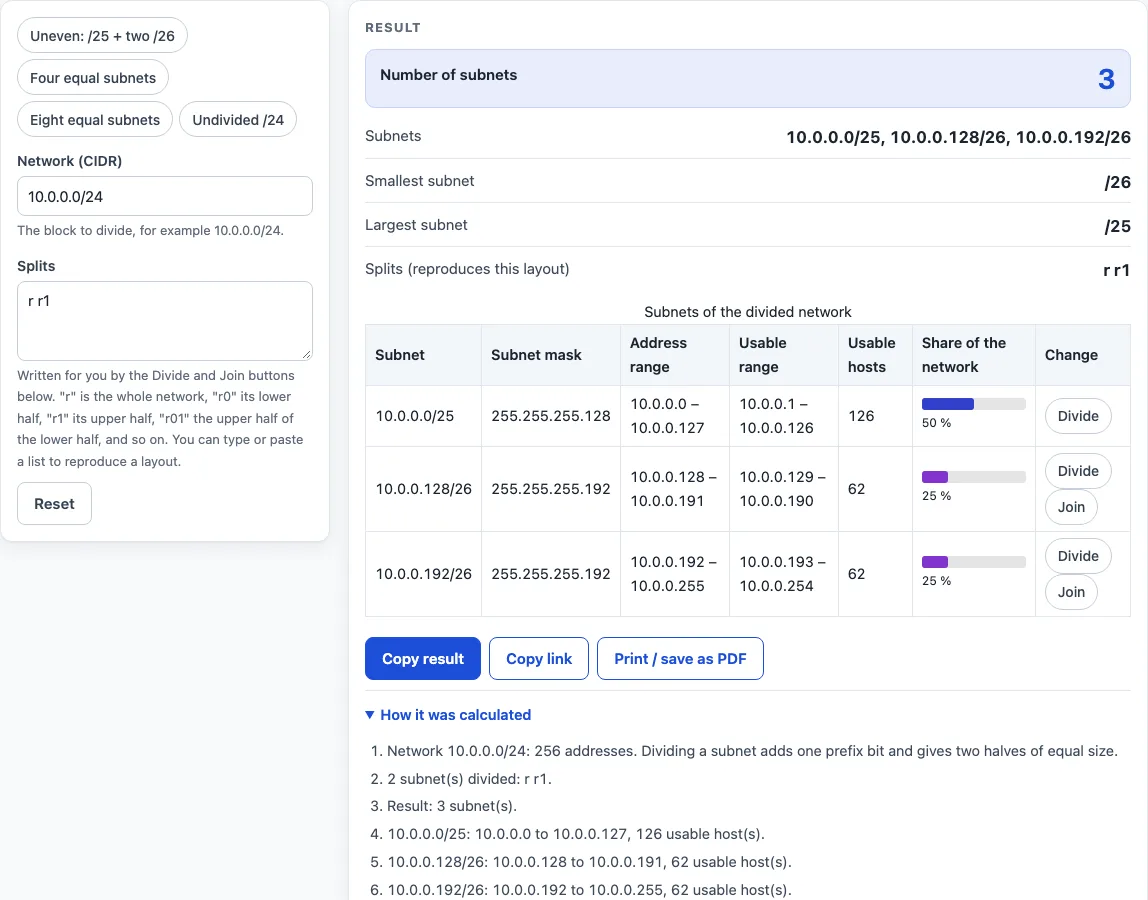
The visual subnet calculator divides one IPv4 network, written in CIDR form such as 10.0.0.0/24, into smaller subnets and shows each one in a table. Click Divide on any row to split it into two equal halves, and keep dividing down to /32; Join puts two halves back together. Each row lists the subnet, its subnet mask, its address range, its usable range, the number of usable hosts, and its share of the whole network.
The tool runs in your browser, so the calculations happen on your own device. It is free, and there is no account or sign-up. Use it when you need an uneven layout, such as one large block for a main office and several smaller blocks for other sites, and you want to see every subnet at once.
How to use the Visual Subnet Calculator
- Type an IPv4 network in CIDR form, for example 10.0.0.0/24. If the address has host bits set, such as 10.0.0.77/24, the calculator uses the network address 10.0.0.0/24 instead.
- Read the table. Each row is one subnet, showing its prefix, subnet mask, address range, usable range, usable host count and coloured share bar.
- Click Divide on a row to split that subnet into two subnets with one more prefix bit. A /32 cannot be divided.
- Click Join on a row whose pair of halves is undivided to merge them back into the parent subnet.
- To set the layout by text, type or paste tokens into the Splits field, for example
r r0 r1. Separate tokens with spaces, commas or semicolons. The table and the Splits text update together. - Check the result: the number of subnets, the list of subnets, and the smallest and largest subnet prefix.
- Read How it was calculated under the result to see the formula, the values it used and the answer.
Preset buttons above the form load the default uneven layout, four equal subnets, eight equal subnets, or the undivided 192.0.2.0/24 documentation block. Reset restores the starting example.
The Splits text and the page address change with every click, so Copy link always reproduces the exact layout you see.
How do you divide a network into subnets?
To divide a network, you add prefix bits. Each split turns one block with prefix length n into two blocks with prefix length n+1, and each new block holds half the addresses of its parent. For example, splitting 10.0.0.0/24 once gives 10.0.0.0/25 and 10.0.0.128/25, each with 128 addresses.
Splitting again doubles the count. Two splits of a /24 give four equal /26 blocks of 64 addresses each.
How many usable hosts does each subnet have?
Start with the total number of addresses in the subnet, which is 2 to the power of (32 minus the prefix length). Then subtract 2 for the network address and the broadcast address, as RFC 950 specifies. A /26 has 64 addresses and 62 usable hosts.
Two prefixes follow different rules. A /31 has 2 usable addresses (RFC 3021), and a /32 has 1.
How is a subnet’s share of the network calculated?
A subnet’s share is its size divided by the size of the whole network, shown as a percentage. A /25 inside a /24 holds 128 of 256 addresses, so its share is 50 %. A /26 holds 64 of 256, so its share is 25 %.
The same method works for any network. A /16 split into eight /19 subnets gives each subnet 8,192 addresses, which is one eighth, or 12.5 %, of the network.
How do split tokens like r0 and r01 work?
Each token names a path from the whole network. The letter r is the whole network, 0 selects the lower half, and 1 selects the upper half. So r01 is the upper half of the lower half. The leading r is optional for sub-paths, and any missing parent splits are added automatically.
A token must be r followed only by 0 and 1 digits, and a split cannot go deeper than /32. The table shows at most 256 subnets, and reaching that count triggers a warning. For example, r r0 r1 r00 r01 r10 r11 applied to 172.16.0.0/16 produces eight /19 subnets, from 172.16.0.0/19 to 172.16.224.0/19.
Worked examples
| Input | Result |
|---|---|
| 10.0.0.0/24, splits r r1 | 3 subnets: 10.0.0.0/25, 10.0.0.128/26, 10.0.0.192/26 |
| 192.0.2.0/24, splits r r0 r1 | 4 subnets: 192.0.2.0/26, 192.0.2.64/26, 192.0.2.128/26, 192.0.2.192/26 |
| 172.16.0.0/16, splits r r0 r00 r01 r1 r10 r11 | 8 subnets: 172.16.0.0/19, 172.16.32.0/19, 172.16.64.0/19, 172.16.96.0/19, 172.16.128.0/19, 172.16.160.0/19, 172.16.192.0/19, 172.16.224.0/19 |
| 198.51.100.0/24, splits r r0 r00 r000 r1 | 6 subnets: 198.51.100.0/28, 198.51.100.16/28, 198.51.100.32/27, 198.51.100.64/26, 198.51.100.128/26, 198.51.100.192/26 |
Calculated by the tool above with these values.
Frequently asked questions
Is the calculator free, and is anything I type uploaded?
Yes, the calculator is free and needs no account or sign-up. Everything is calculated in your browser, and nothing you type is uploaded.
Can I print or share a calculation?
Yes. Print / save as PDF creates a one-page record with the inputs, results, calculation steps and the date. Copy link copies the page address, which stores every input in the ?s= part of the URL, so the same calculation reopens later or can be sent to a colleague. Copy result copies the result lines with a link.
Can I use the results in work reports or client projects?
Yes. Results may be used in any work, including commercial reports, theses and client projects, without attribution. Still check them against your network design before you change a live configuration.
Why did my network address change when I typed it?
The network text had host bits set. For example, 10.0.0.77/24 has host bits in its last octet, so the calculator uses the network address 10.0.0.0/24 instead.
Why does the calculator show a warning about subnets?
The table shows at most 256 subnets. When a layout reaches 256, the calculator shows a warning, so you need fewer divided subnets to stay within the limit.
Related tools
- VLSM calculator: use it when subnets need different sizes and you want each one sized to a required host count.
- Subnet calculator: use it to look up the details of a single network, such as its range and host count.
- Subnet mask calculator: use it to convert between a prefix length and its dotted-decimal subnet mask.
- CIDR calculator: use it to work with CIDR notation and prefix lengths.
- Subnetting practice: use it to test yourself on subnetting problems before you rely on your own answers.
- Subnet cheat sheet: use it as a quick reference for common prefix lengths and their host counts.