VLSM Calculator
Enter a network and the hosts each subnet needs to get a variable length subnet mask plan with every range and mask.
Recent
Your last 10 settings, saved only in this browser. Nothing is uploaded.
How to use the VLSM calculator
- Type the major network in the Major network (CIDR) box, for example
192.168.1.0/24. If you enter a host address such as192.168.1.77/24, the calculator uses the network address192.168.1.0/24and shows a warning. - In Required subnets, enter one subnet per line as
name, hosts, for exampleSales, 100. You can also enter only a host count. Names can contain digits and spaces, such asVLAN 10, 50. - Look at the result. It updates as you type, so you do not need a separate button.
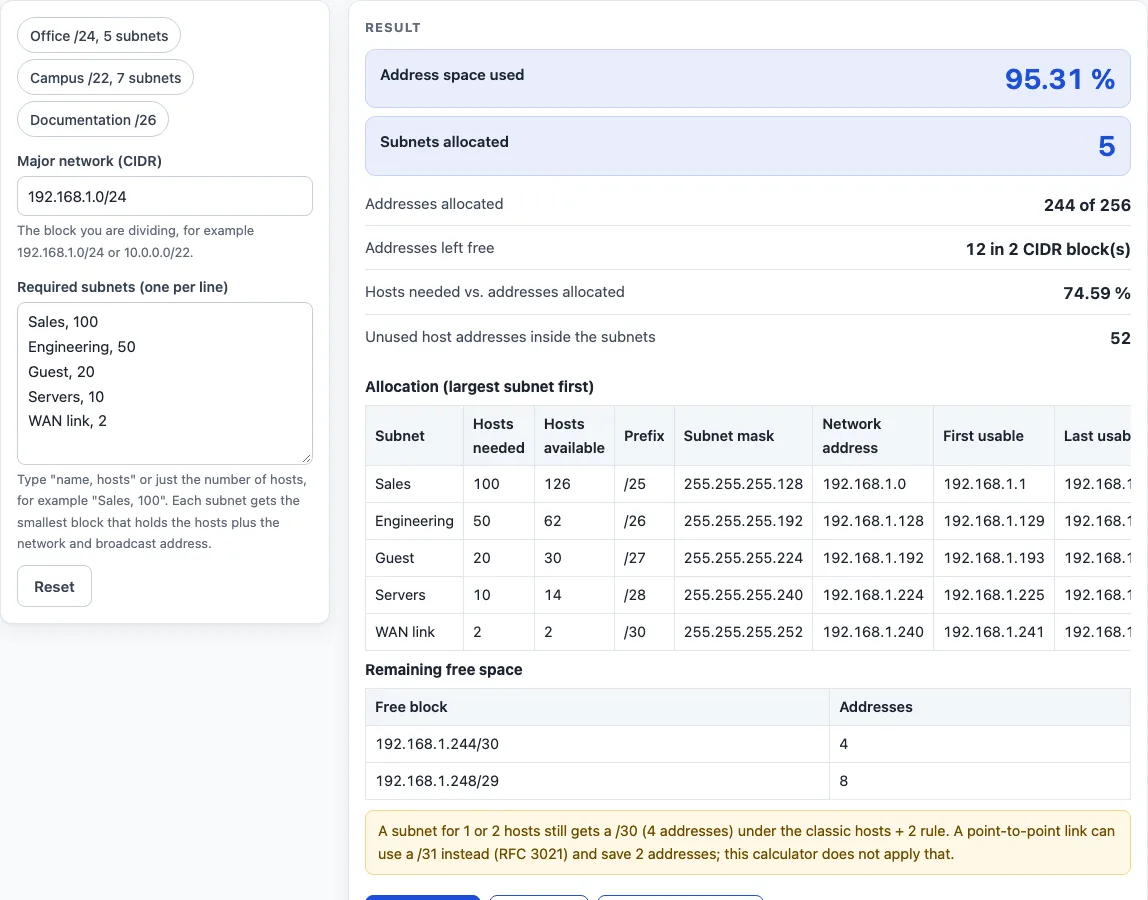
- Read the subnet table. It lists the name, hosts needed, hosts available, prefix, subnet mask, network address, first usable, last usable, broadcast and unused hosts for each subnet.
- Read the summary rows. They show the number of subnets, the addresses allocated, the percentage of the network used, the free addresses and the CIDR blocks that cover them, and the hosts needed compared with the addresses allocated.
- Open How it was calculated under the result to see the formula, the values substituted and the answer.
- If you see an error saying the subnets are too large, use a larger major network with a shorter prefix, or reduce the host counts.
Use the preset buttons above the form (Office /24, Campus /22 or Documentation /26) to load typical cases. Reset restores the starting example. Copy result copies the result lines with a link. Copy link stores every input in the page address, and Print / save as PDF prints a one-page record.
What does a VLSM calculator do with each subnet?
A VLSM calculator gives each subnet its own prefix length, so a department with many hosts gets a large block and a point-to-point link gets a small one. It works from the major network and cuts out one block for each requirement. This is the approach defined in RFC 1878 for variable length subnet masks.
How many addresses does each subnet get?
A subnet that needs H hosts receives the smallest power-of-two block with at least H + 2 addresses. The two extra addresses are the network address and the broadcast address, which are not hosts (RFC 950). The prefix is 32 minus the base-2 logarithm of the block size. For example, 100 hosts need 102 addresses, which rounds up to 128 (2 to the power of 7), so the prefix is /25. Because of this rule, the smallest block is a /30 with 4 addresses and 2 hosts, so one-host and two-host subnets both receive a /30. If any subnet asks for 1 or 2 hosts, the calculator notes that a point-to-point link could use a /31 under RFC 3021, which saves two addresses. It still keeps the classic rule.
Why are subnets placed largest first?
The calculator sorts the requirements by host count, largest first, and keeps the input order for ties. Each block is then placed at the next free address, starting at the network address. Every block is a power of two, so placing the large blocks first keeps each one aligned to its own size and leaves no gaps between them.
How is the unused space reported?
Free space is the part of the major network that no subnet uses. The calculator lists it as the fewest CIDR blocks that cover it exactly. In the default example, the free space is 192.168.1.244/30 and 192.168.1.248/29. Unused host addresses inside each subnet are counted separately.
What happens when the subnets do not fit?
The total of all blocks cannot be larger than the major network. If it is, the calculator refuses to produce a layout and states how many addresses it is short. For example, three subnets of 100 hosts need three 128-address blocks, which is 384 addresses, but a /24 has only 256, so the result is short by 128 addresses.
Worked examples
| Input | Result |
|---|---|
| 192.168.1.0/24, 5 subnets | 192.168.1.0/25, 192.168.1.128/26, 192.168.1.192/27, 192.168.1.224/28, 192.168.1.240/30; 95.31 % of the space used |
| 10.0.0.0/22, 7 subnets | 10.0.0.0/24, 10.0.1.0/24, 10.0.2.0/25, 10.0.2.128/26, 10.0.2.192/28, 10.0.2.208/30, 10.0.2.212/30; 71.09 % of the space used |
| 172.16.0.0/24, 4 subnets | 172.16.0.0/26, 172.16.0.64/26, 172.16.0.128/27, 172.16.0.160/28; 68.75 % of the space used |
| 203.0.113.0/26, 3 subnets | 203.0.113.0/27, 203.0.113.32/28, 203.0.113.48/30; 81.25 % of the space used |
Calculated by the tool above with these values.
Frequently asked questions
Is the calculator free, and is anything I type uploaded?
Yes, the calculator is free, and it needs no account or sign-up. Everything is calculated in your browser, so nothing you type is uploaded or sent anywhere.
Can I print or share a calculation?
Yes. Print / save as PDF creates a one-page record with the inputs, results, calculation steps and date. Copy link copies a page address that stores every input, so the calculation can be reopened later or sent to a colleague.
Can I use the results in a commercial report or thesis?
Yes. Results may be used in any work, including commercial reports, theses and client projects, without attribution.
Does this VLSM calculator work with IPv6?
No. This page covers IPv4 only, so the major network must be an IPv4 CIDR block such as 192.168.1.0/24. IPv6 networks are not supported here.
What if the calculator says my subnets are too large for the network?
The calculator stops and states how many addresses you are short. To fix this, use a major network with a shorter prefix, such as /23 with 512 addresses instead of /24 with 256, or reduce the host counts for some subnets.
Does the order of my lines matter?
No. The calculator always places the largest subnet first, so the result is the same in any order; ties keep the order you typed.
Related tools
- Visual subnet calculator — when you want a visual view of how subnets sit within a network.
- Subnet calculator — when you have a single subnet and need its address range and broadcast address.
- Subnet mask calculator — when you need to convert between a prefix length and a dotted subnet mask.
- CIDR calculator — when you are working with CIDR notation and block sizes.
- Subnetting practice — when you want to practise subnetting by hand before checking your answers.
- Subnet cheat sheet — when you need a quick reference for prefixes, masks and block sizes.