Well Known Ports
Look up a TCP or UDP port number, a range or a service name and see what the IANA registry assigns to it.
Recent
Your last 10 settings, saved only in this browser. Nothing is uploaded.
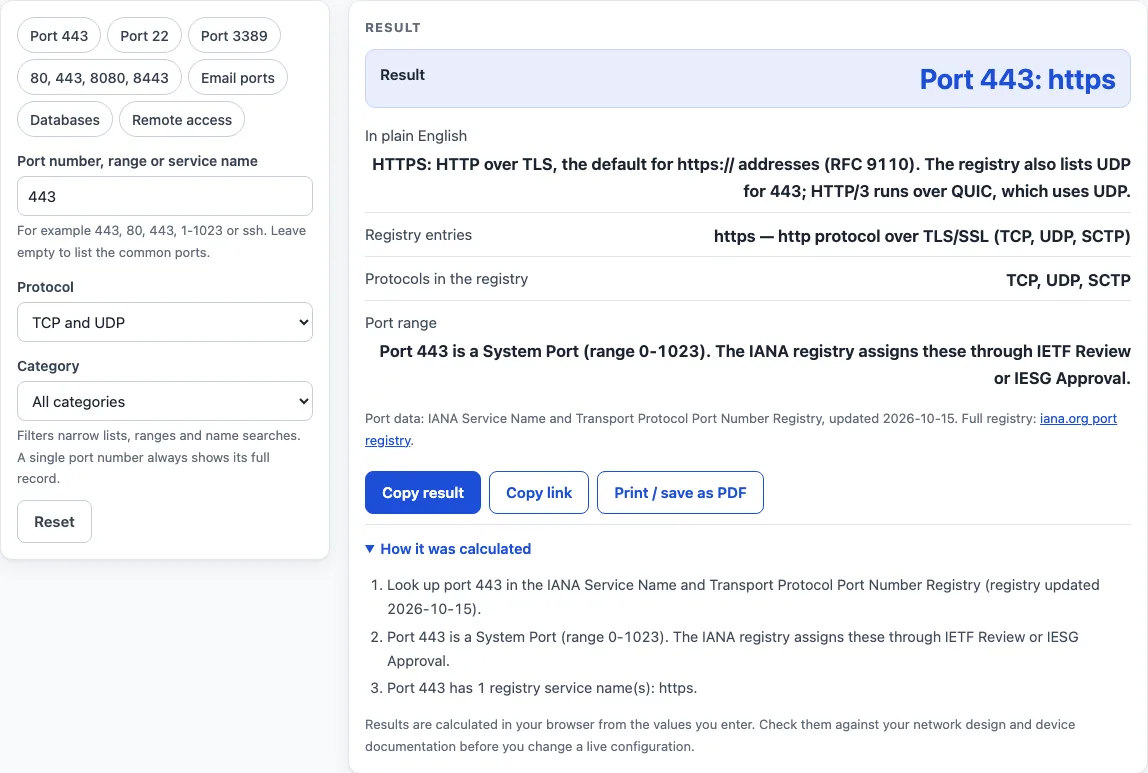
How to use the well-known ports lookup
- In Port number, range or service name, type a single number (443), a list (80, 443, 8080, 8443), a range (1-1023), a service name (ssh, smtp) or a word (database, mail). A leading word “port” is ignored, so “port 443” works like 443.
- Leave the box empty to list the common ports.
- Use Protocol to choose TCP and UDP (the default), TCP only or UDP only.
- Use Category to pick Web, Email, Remote access and so on, or keep All categories. Filters narrow lists, ranges and name searches. A single port number always shows its full record.
- Or click a preset: Port 443, Port 22, Port 3389, 80/443/8080/8443, Email ports, Databases or Remote access.
- Read the result. A single port shows a headline such as “Port 443: https”, a plain-English explanation, the registry entries, the protocols and the port range. A list or search shows a table of up to 250 rows with the number of matches.
- Open “How it was calculated” to see which registry rows and filters were used.
- Use Copy result to copy the answer as text, or Print / save as PDF for a one-page record of the lookup with the date.
To open a lookup straight away, add the port to the address, for example /well-known-ports/?port=443. Copy link also stores your filters.
What is a port number?
A port number is a number from 0 to 65535 that tells a computer which service should receive incoming network traffic. Together with an IP address and a protocol (TCP or UDP), it identifies one conversation, so one machine can run a web server, a mail server and a remote-login service at once. A client connects to the service’s port number, for example 443 for a secure website.
What are the well-known ports?
The well-known ports are the system ports, numbered 0 to 1023. IANA assigns them through IETF Review or IESG Approval, and 686 of them have a named service in the registry. A system port that is not in the tool has no service assigned: the registry lists it as unassigned or reserved. Ports 1024 to 49151 are user ports, which can be registered, and 49152 to 65535 are dynamic or private ports that operating systems use as temporary source ports. The tool also lists 39 common registered ports in the user range.
What is port 443?
Port 443 is the default port for https:// addresses, so encrypted web traffic normally uses it. The registry names it https, “http protocol over TLS/SSL”, for TCP, UDP and SCTP. HTTP/3 runs over QUIC, which uses UDP, and the registry also lists UDP for 443.
What is port 80?
Port 80 is the default port for http:// addresses and carries unencrypted web traffic. The registry lists it as http, with the names www and www-http, described as “World Wide Web HTTP”.
What is port 22?
Port 22 is the Secure Shell (SSH) port, used for encrypted remote login and for running commands on another machine. SFTP and SCP use the same port. The registry name is ssh.
What is port 3389?
Port 3389 is the default port of the Windows Remote Desktop server, which listens on TCP and UDP. The registry does not use the name RDP. It lists ms-wbt-server, “MS WBT Server”.
What is port 25?
Port 25 is registered as smtp, Simple Mail Transfer. Mail servers use it to relay email to each other. Mail clients normally send outgoing mail on port 587 (message submission, RFC 6409) or 465 (implicit TLS, RFC 8314) instead.
What is port 53?
Port 53 is the Domain Name System, registered as domain. DNS servers answer on UDP port 53 and on TCP port 53, and TCP is used for answers that do not fit in one UDP message and for zone transfers.
What is port 8080?
Port 8080 is registered as http-alt, “HTTP Alternate (see port 80)”. Proxies, application servers such as Apache Tomcat and development servers often use it when port 80 is taken or needs elevated privileges.
Worked examples
| Input | Result |
|---|---|
| 443 | Port 443: https |
| 22 | Port 22: ssh |
| 3389 | Port 3389: ms-wbt-server |
| 25, 110, 143, 465, 587, 993, 995 | 7 matching ports |
| 6379 | Port 6379: redis |
Calculated by the tool above with these values.
Frequently asked questions
Does a registry entry mean that service is really running on the port?
No. IANA says that an assignment does not imply an endorsement of an application, and that traffic on a registered port may not match the assigned service. For example, 1521 is registered to the nCube License Manager although Oracle Database listeners are often set up on it, and 8443 is registered as pcsync-https but widely used as an alternate HTTPS port.
Why does the tool say a port has no service assigned?
For system ports 0 to 1023 it means the registry lists the number as unassigned or reserved, as of its last update on 2026-10-15. For numbers above 1023 the tool shows only about 40 widely used ports, so it says the number is not in its list and links to the full registry.
Why do some ports show TCP only?
The registry assigns a number separately for each protocol. Redis on 6379 and MongoDB on 27017 have a TCP assignment only, and the UDP rows are marked Reserved, so the tool lists TCP alone.
Can I link to a specific port?
Yes. Add ?port= and the number to the page address, for example /well-known-ports/?port=3389, and the page opens with that port looked up.
Where does the data come from, and is anything uploaded?
The service names and descriptions come from the IANA registry, updated 2026-10-15, and the plain-English notes were written for this page. The lookup runs in your browser and nothing you type is uploaded.
Related tools
- RJ45 wiring diagram: use it for the pin and color order of an Ethernet cable.
- Mbps to MB/s: use it to convert link speeds and estimate transfer times.
- Private IP address ranges: use it to check whether an address is private or public.
- Subnet calculator: use it to work out network and host ranges for an address and mask.
- CIDR calculator: use it to convert between CIDR prefixes and address counts.
- MAC address lookup: use it to find the manufacturer behind a hardware address.