Wildcard Mask Calculator
Enter a subnet mask, prefix or wildcard, or an address range, to get the wildcard mask and the matching ACL lines.
Recent
Your last 10 settings, saved only in this browser. Nothing is uploaded.
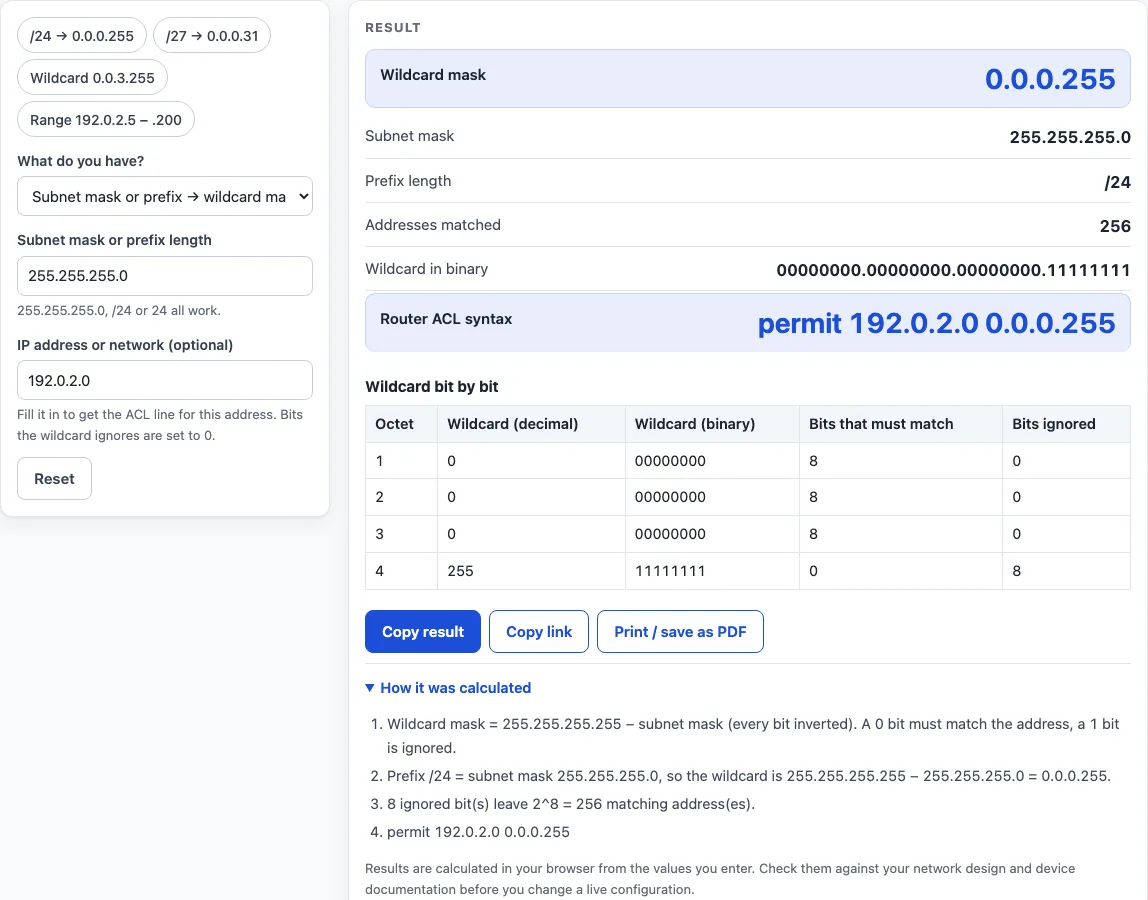
How to use the wildcard mask calculator
- Choose a mode above the form: Subnet mask or prefix, Wildcard mask, or Address range.
- In Subnet mask or prefix mode, type a mask such as 255.255.255.0, a prefix such as /24, or just 24. Read the wildcard mask, subnet mask, prefix length, number of addresses matched and the wildcard in binary.
- In Wildcard mask mode, type a wildcard such as 0.0.3.255. If its 1 bits sit on the right, the tool shows the subnet mask 255.255.252.0 and the prefix /22. If they do not, the tool says there is no subnet mask or prefix, shows which bits are matched and which are ignored in each octet, and displays a warning.
- In Address range mode, type the start address and the end address. Both are included in the range. Each block in the table becomes one permit line.
- To get an ACL line in the other modes, fill in the optional IP address or network field. The line is written as permit
. - Open How it was calculated under the result to see the formula, the values substituted and the answer.
Preset buttons above the form load typical cases, and Reset restores the starting example. Copy result copies the result lines with a link. Copy link copies the page address, which stores every input, so the same calculation reopens later or can be sent to a colleague. Print / save as PDF creates a one-page record with the inputs, results, calculation steps and date.
What is a wildcard mask?
A wildcard mask is the bitwise inverse of a subnet mask. You get it by subtracting the subnet mask from 255.255.255.255. In a wildcard, a 0 bit means the address bit must match exactly, and a 1 bit means the bit is ignored.
For a /24 network, the subnet mask is 255.255.255.0. Subtracting gives 0.0.0.255, so the first three octets must match and the last octet can be anything. Router ACLs use wildcards in this way to say which addresses a line applies to.
How do you convert a subnet mask or prefix to a wildcard mask?
Subtract each octet of the subnet mask from 255. For a /27 prefix, the subnet mask is 255.255.255.224, and 255 minus 224 is 31, so the wildcard is 0.0.0.31. Some common examples are:
- /16 gives 0.0.255.255
- /19 gives 0.0.31.255
- /30 gives 0.0.0.3
- /32 gives 0.0.0.0
- /0 gives 255.255.255.255
The number of matched addresses is 2 raised to the number of 1 bits in the wildcard. For 0.0.3.255, that is 2 raised to the 10th power, or 1,024 addresses.
What is a discontiguous wildcard mask?
A discontiguous wildcard mask, also called non-contiguous, has 1 bits that are not all grouped on the right side. An example is 0.0.255.0. Because it does not match a single subnet mask, it has no prefix length. The calculator still accepts it, since router ACLs allow it, and shows the matched and ignored bits for each octet.
The matched count still follows the same rule. 0.0.255.0 has eight 1 bits, so it matches 256 addresses. 0.255.0.255 has sixteen 1 bits, so it matches 65,536 addresses. The tool shows a warning for these masks.
How is an address range turned into wildcard lines?
An address range is split into the fewest CIDR blocks that exactly cover it. Each block becomes one permit line with its own wildcard. A range that is not a single subnet needs more than one line. For example, 192.0.2.5 to 192.0.2.200 needs 9 lines and covers 196 addresses, and the tool warns that the range is not one subnet.
A range that matches one block needs only one line. For 10.0.0.0 to 10.0.3.255, the block is 10.0.0.0/22, so the single line is permit 10.0.0.0 0.0.3.255. The summary follows RFC 4632 aggregation.
Worked examples
| Input | Result |
|---|---|
| Mask 255.255.255.0 | Wildcard 0.0.0.255 (/24) |
| Mask /27 | Wildcard 0.0.0.31 (/27) |
| Wildcard 0.0.3.255 | Mask 255.255.252.0, 1,024 addresses |
| Wildcard 0.0.255.0 | Mask none (the wildcard is not contiguous), 256 addresses |
| 192.0.2.5 to 192.0.2.200 | 9 line(s): permit 192.0.2.5 0.0.0.0; permit 192.0.2.6 0.0.0.1; permit 192.0.2.8 0.0.0.7; permit 192.0.2.16 0.0.0.15; permit 192.0.2.32 0.0.0.31; permit 192.0.2.64 0.0.0.63; permit 192.0.2.128 0.0.0.63; permit 192.0.2.192 0.0.0.7; permit 192.0.2.200 0.0.0.0 |
Calculated by the tool above with these values.
Frequently asked questions
Is the calculator free, and is anything I type uploaded?
Yes, the calculator is free. Everything is calculated in your browser, so nothing you type is uploaded, and there is no account or sign-up. Results may be used in any work, including commercial reports, theses and client projects, without attribution.
Can I print or share a calculation?
Yes. Print / save as PDF creates a one-page record with the inputs, results, calculation steps and date. Copy link copies a page address that stores every input, so the calculation reopens later or can be sent to a colleague.
Why does a wildcard like 0.0.255.0 have no prefix length?
A prefix length only describes a contiguous mask, where all the 1 bits are on the left. The wildcard 0.0.255.0 has its 1 bits in a different pattern, so no single subnet mask corresponds to it. The tool shows which bits are matched and which are ignored instead.
Why does my address range show a warning even though the lines are correct?
The warning means the range is not a single subnet. The tool still gives one permit line for each CIDR block needed to cover the range exactly. The number of lines and the total addresses covered are shown with the result.
Can I use the result directly on a live router?
Check the result first. Results are calculated in your browser from the values you enter. Check them against your network design and device documentation before you change a live configuration.
Related tools
- Subnet calculator: use it when you want a wider breakdown of a network than the wildcard values alone.
- Subnet mask calculator: use it when your main question is converting between a subnet mask and a prefix length.
- CIDR calculator: use it when you are working with CIDR notation and want to check how a prefix covers addresses.
- IP range to CIDR converter: use it when you need the CIDR blocks for an address range without the ACL line output.
- Subnet cheat sheet: use it as a quick reference for common prefix lengths and their masks.
- IP to binary converter: use it when you want to see the binary bits of a wildcard or address.